01The productDas Produkt
Solo creators don't fail at content — they fail at consistency. blogi. pairs a creator with an AI co-writer: it proposes carousel ideas, drafts slides and reels scripts in the creator's voice, and triages comments. The tagline is the promise: "Grow a blog without a marketer."
Solo-Creator scheitern nicht am Content — sie scheitern an der Konsistenz. blogi. stellt Creators eine AI-Co-Autorin zur Seite: Sie schlägt Carousel-Ideen vor, entwirft Slides und Reels-Skripte im Ton des Creators und sortiert Kommentare. Die Tagline ist das Versprechen: „Grow a blog without a marketer."
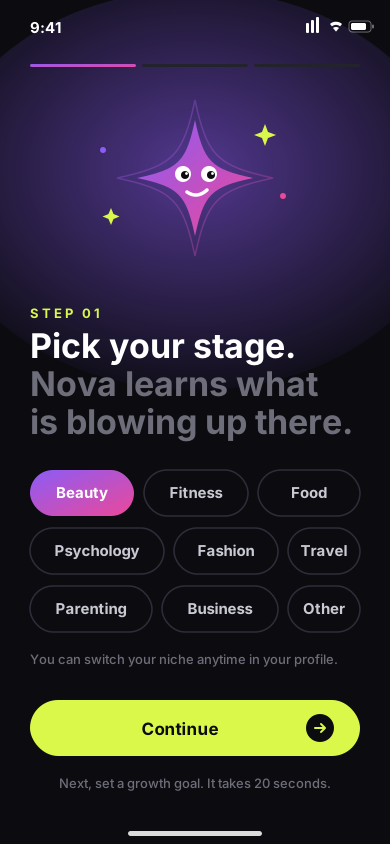
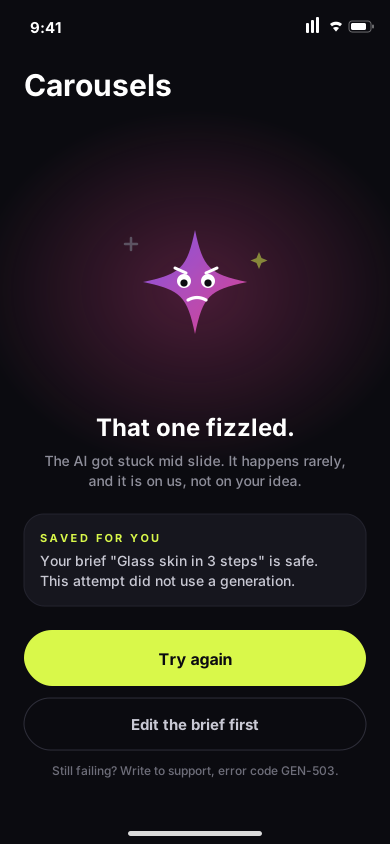
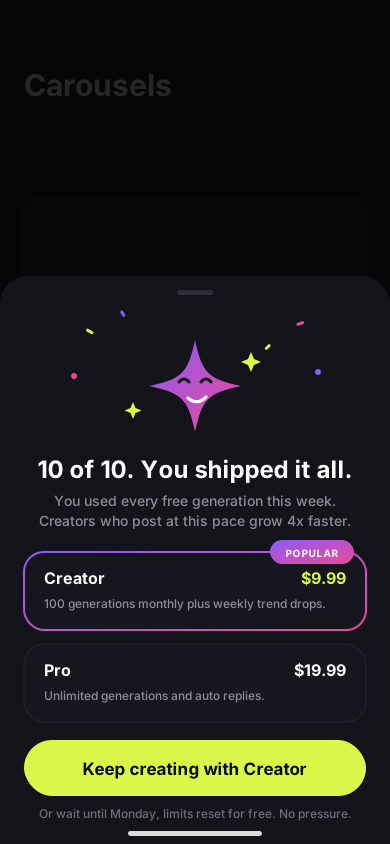
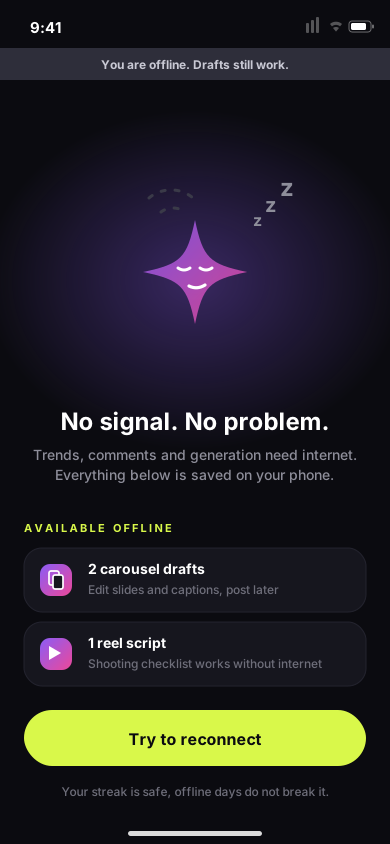
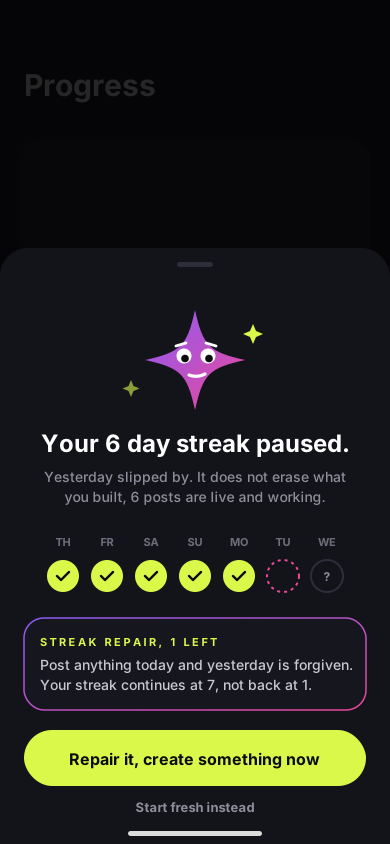
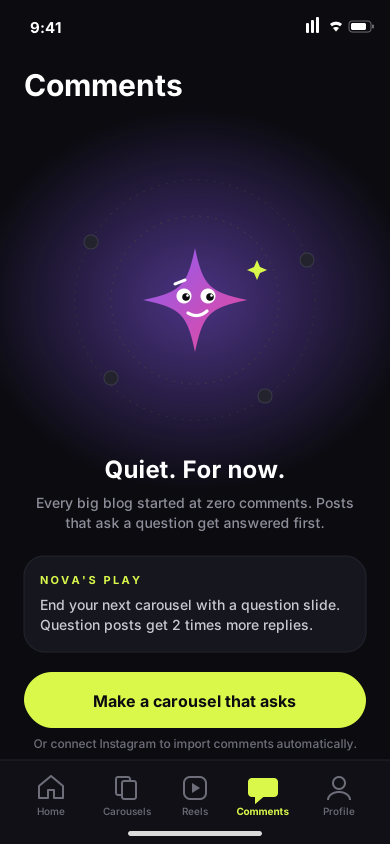
The emotional layer is designed, not decorated. The mascot — Nova, a spark creature — appears only at emotional moments: onboarding, empty states, errors, limits, celebrations. Never on working screens. Personality where it helps, silence where you work.
Die emotionale Ebene ist designt, nicht dekoriert. Das Maskottchen Nova — ein Funkenwesen — erscheint nur in emotionalen Momenten: Onboarding, Empty States, Fehler, Limits, Erfolge. Nie auf Arbeits-Screens. Persönlichkeit, wo sie hilft — Stille, wo man arbeitet.
02Research kickoff — topic, proto-personas, hypothesesResearch-Start — Thema, Proto-Personas, Hypothesen
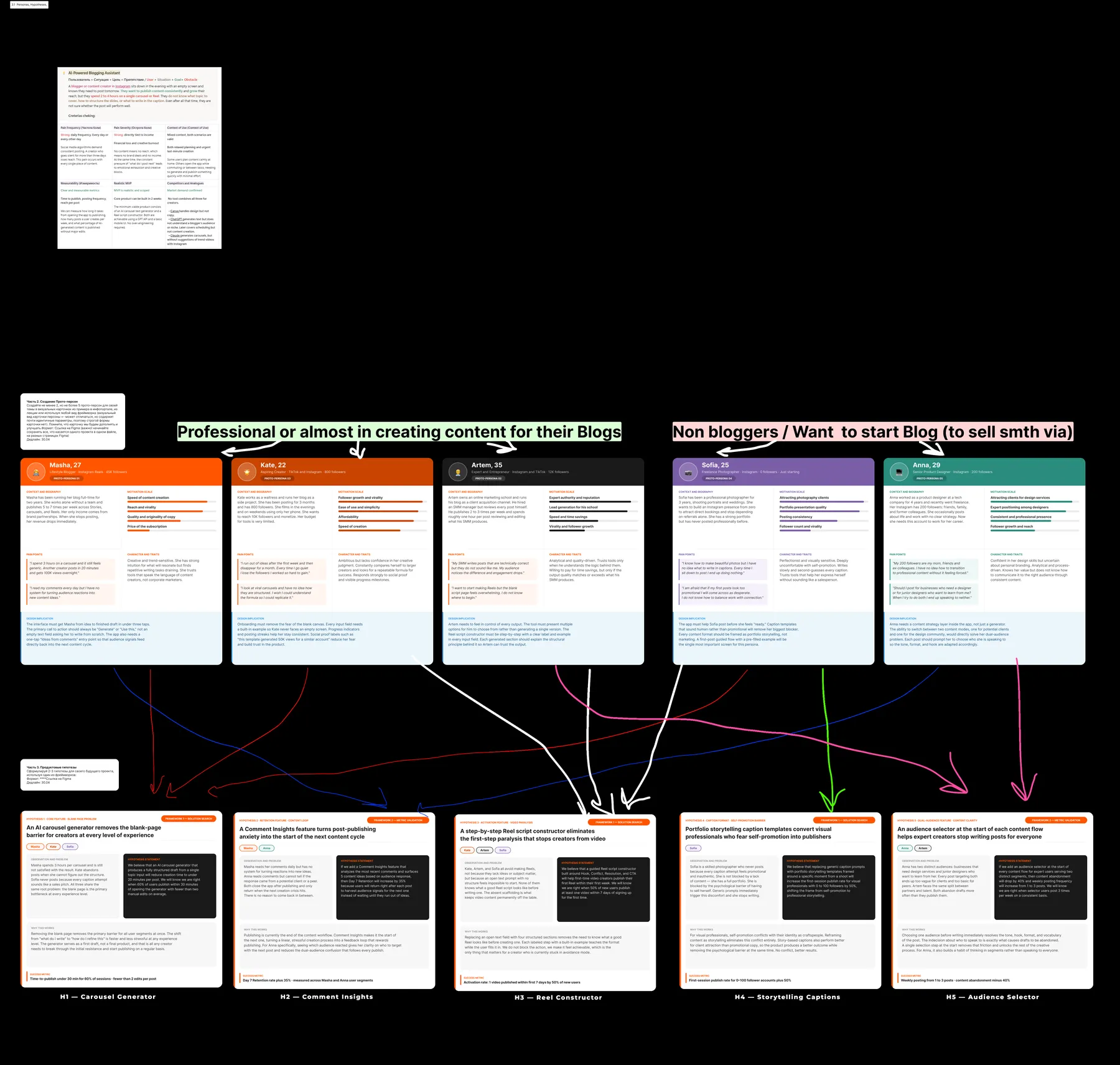
blogi. was built like a real product, not a UI exercise: before a single screen, I framed the topic ("a theme is not an app idea"), sketched proto-personas and formulated testable hypotheses.
blogi. entstand wie ein echtes Produkt, nicht als UI-Übung: Vor dem ersten Screen habe ich das Thema geschärft, Proto-Personas skizziert und testbare Hypothesen formuliert.
| Persona groupPersona-Gruppe | WhoWer |
|---|---|
| Creators — professional or almostCreator — professionell oder fast | 3 personas already producing content for their blogs and drowning in the production routine3 Personas, die bereits Content für ihre Blogs produzieren und in der Produktionsroutine versinken |
| Non-bloggersNicht-Blogger | 2 personas who want to start a blog to sell something — and never get past the blank screen2 Personas, die einen Blog starten wollen, um etwas zu verkaufen — und nie über den leeren Screen hinauskommen |
Each persona was mapped (literally, with arrows) to 5 hypotheses: Carousel Generator · Comment Insights · Reel Constructor · Storytelling Copilot · Audience Detector. Every hypothesis states the pain, the missing solution on the market and what would falsify it.Jede Persona wurde (buchstäblich, mit Pfeilen) auf 5 Hypothesen gemappt: Carousel Generator · Comment Insights · Reel Constructor · Storytelling Copilot · Audience Detector. Jede Hypothese benennt den Schmerz, die Marktlücke und ihr Falsifizierungskriterium.
03CustDev — deep interviews & hypothesis validationCustDev — Deep Interviews & Hypothesen-Validierung
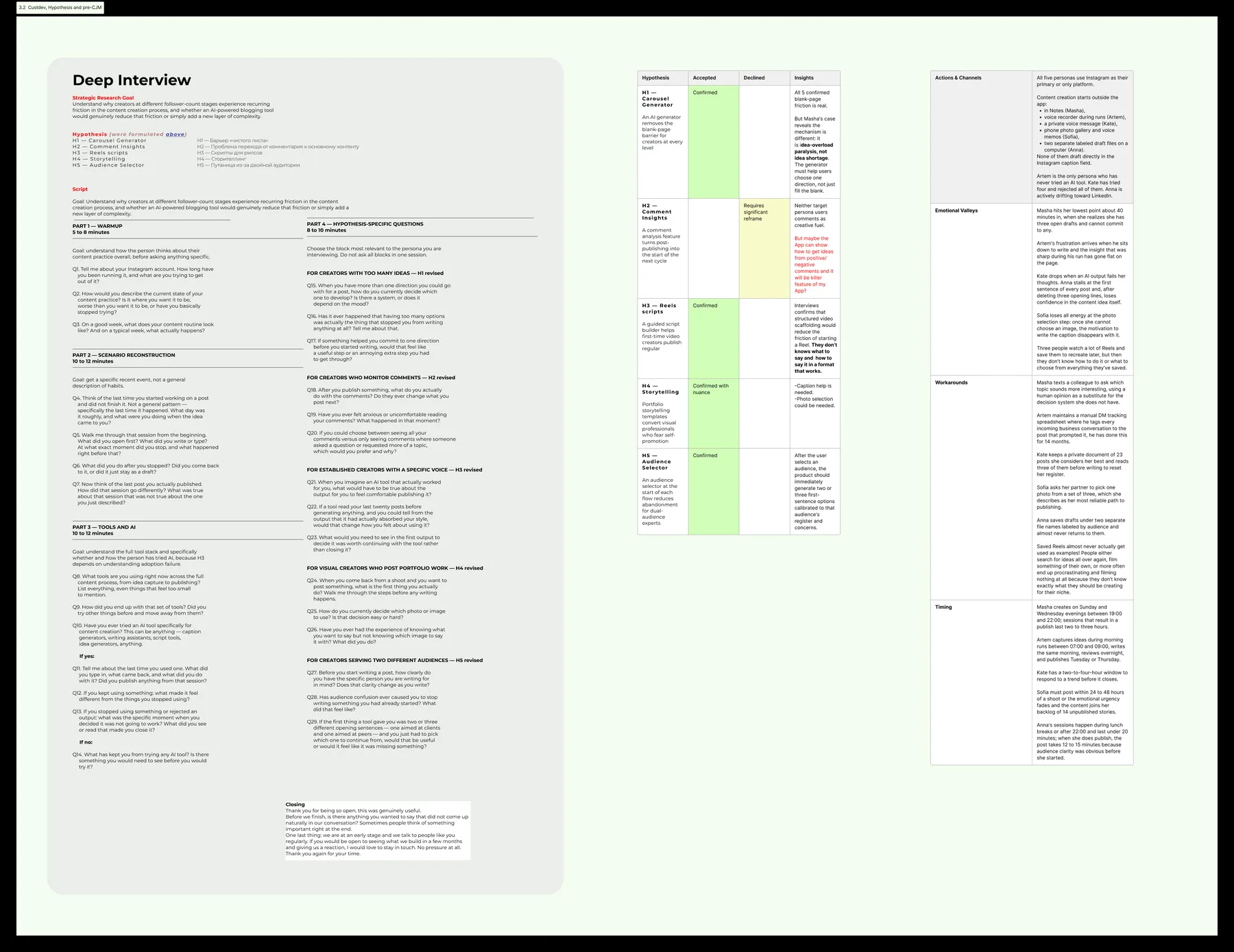
A full deep-interview script — screener, past-behavior questions, specific-situation probes, no leading questions — then interviews, transcripts and a validation report. The output is a hypothesis table: each of the 5 hypotheses marked validated / rejected / needs data, with the insight that decided it. The same interviews fed the pre-CJM: real quotes and pains collected per journey stage.
Ein vollständiges Deep-Interview-Skript — Screener, Fragen zu vergangenem Verhalten, konkrete Situationen, keine Suggestivfragen — dann Interviews, Transkripte und ein Validierungsreport. Das Ergebnis: eine Hypothesen-Tabelle — jede der 5 Hypothesen als validiert / verworfen / braucht Daten markiert, mit dem entscheidenden Insight. Dieselben Interviews speisten das Pre-CJM: echte Zitate und Schmerzen je Journey-Phase.
04CJM — the creator's journey, end to endCJM — die Creator-Journey, End-to-End
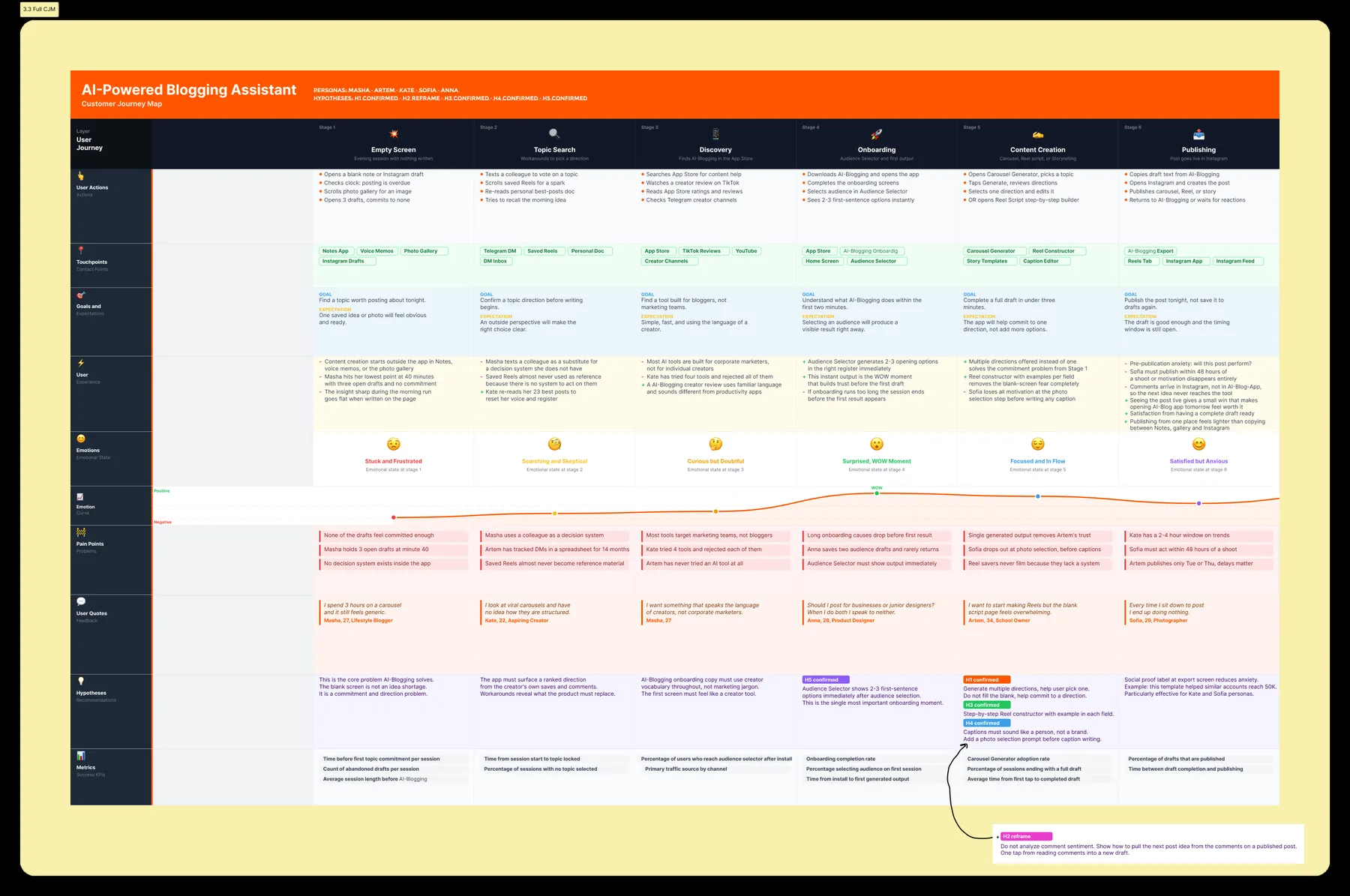
Six stages — Empty Screen → Topic Search → Discovery → Onboarding → Content Creation → Publishing — with layers for actions, touchpoints, thoughts, an emotion curve, pain points, verbatim quotes and "how might we" opportunities. The CJM is where the hypotheses live in context: it shows exactly where the blank-screen pain kills consistency, and it became the base for user flows and task prioritization.
Sechs Phasen — Empty Screen → Topic Search → Discovery → Onboarding → Content Creation → Publishing — mit Ebenen für Aktionen, Touchpoints, Gedanken, Emotionskurve, Pain Points, O-Ton-Zitaten und „How might we"-Chancen. Im CJM leben die Hypothesen im Kontext: Es zeigt, wo genau der Blank-Screen-Schmerz die Konsistenz killt — und wurde Basis für User Flows und Priorisierung.
05Competitor & benchmark analysisKonkurrenz- & Benchmark-Analyse
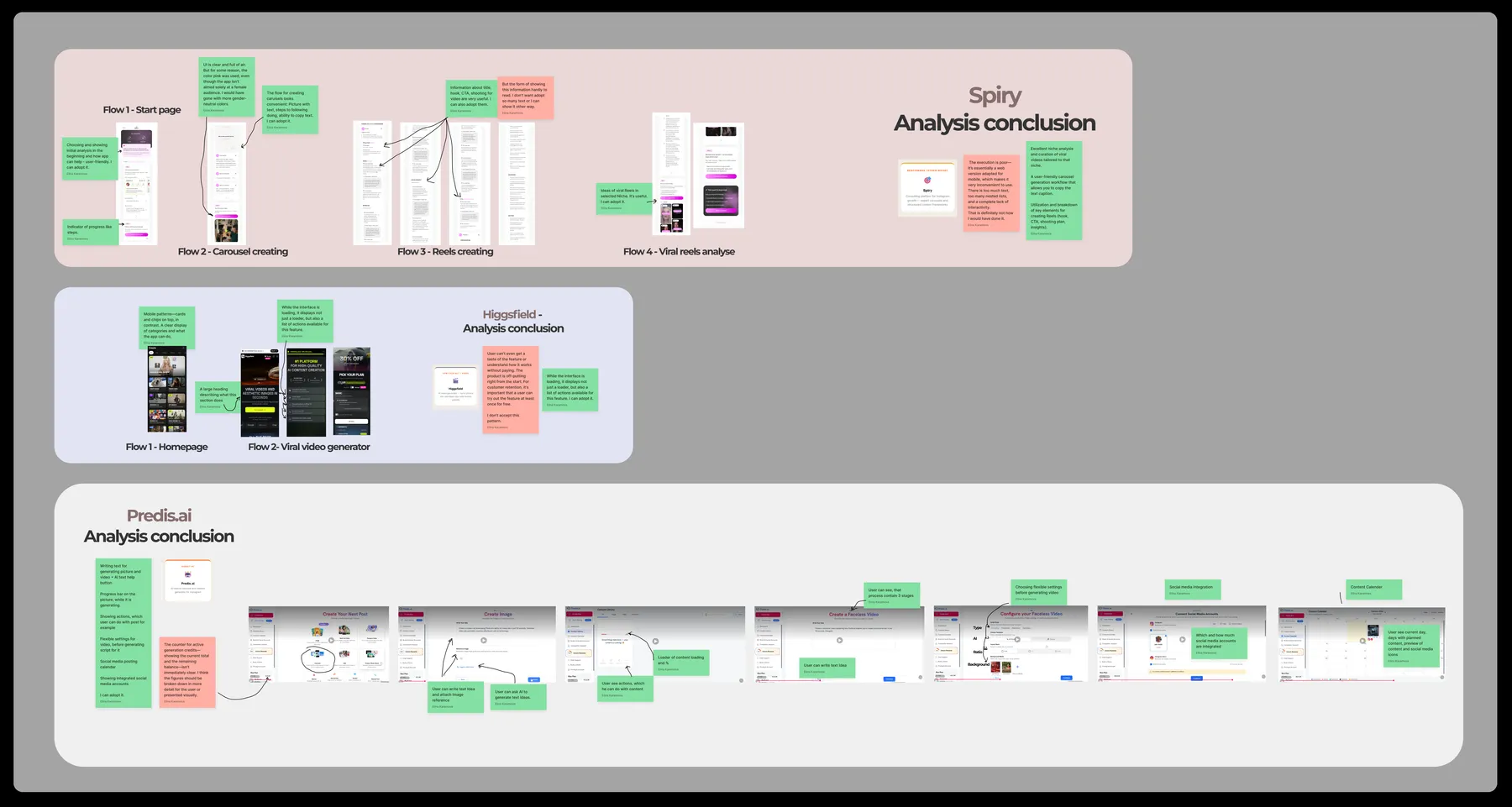
Three competitor apps taken apart screen by screen: a feature matrix (horizontal — what everyone has; vertical — where the gaps are), annotated UX teardowns of their core flows with per-screen conclusions, and a synthesis board that turns the gap analysis into product decisions. Rule applied: every product decision must trace back to pains + CJM + competitor gaps — not taste.
Drei Konkurrenz-Apps Screen für Screen zerlegt: eine Feature-Matrix (horizontal — was alle haben; vertikal — wo die Lücken sind), annotierte UX-Teardowns ihrer Kern-Flows mit Fazit pro Screen und ein Synthese-Board, das die Gap-Analyse in Produktentscheidungen übersetzt. Regel: Jede Produktentscheidung muss auf Pains + CJM + Konkurrenzlücken zurückführbar sein — nicht auf Geschmack.
06MVP scope & information architectureMVP-Scope & Informationsarchitektur
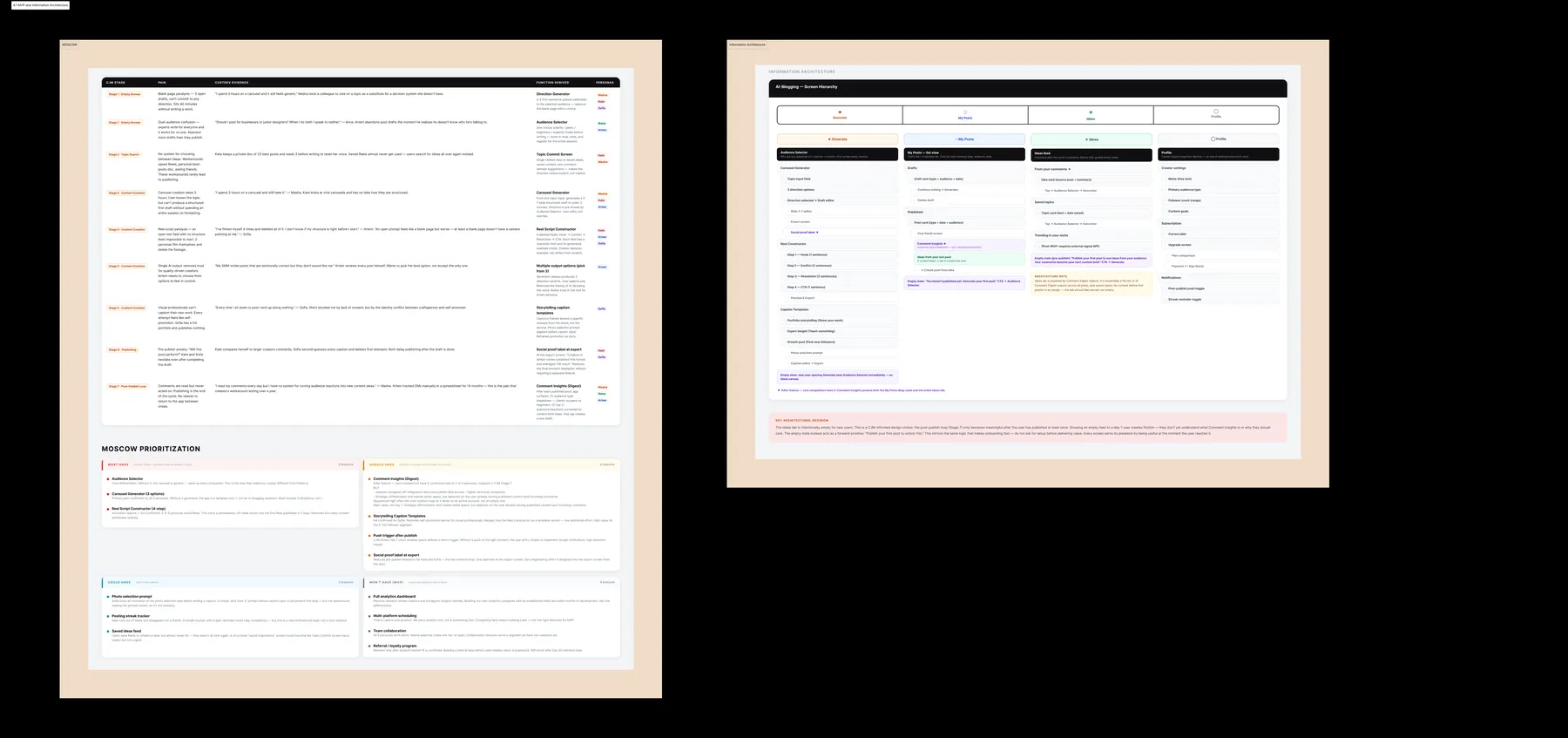
MoSCoW cut the validated hypotheses down to an MVP that fights the one confirmed killer pain — the blank screen. The information architecture maps every feature to its place in a four-tab structure, marking what ships in MVP and what waits, so the flows and wireframes had a fixed skeleton to build on.
MoSCoW hat die validierten Hypothesen auf ein MVP reduziert, das den einen bestätigten Killer-Schmerz bekämpft — den leeren Screen. Die Informationsarchitektur ordnet jedes Feature seinem Platz in einer Vier-Tab-Struktur zu, markiert MVP vs. später — das feste Skelett für Flows und Wireframes.
07JTBD & User Story MapJTBD & User Story Map
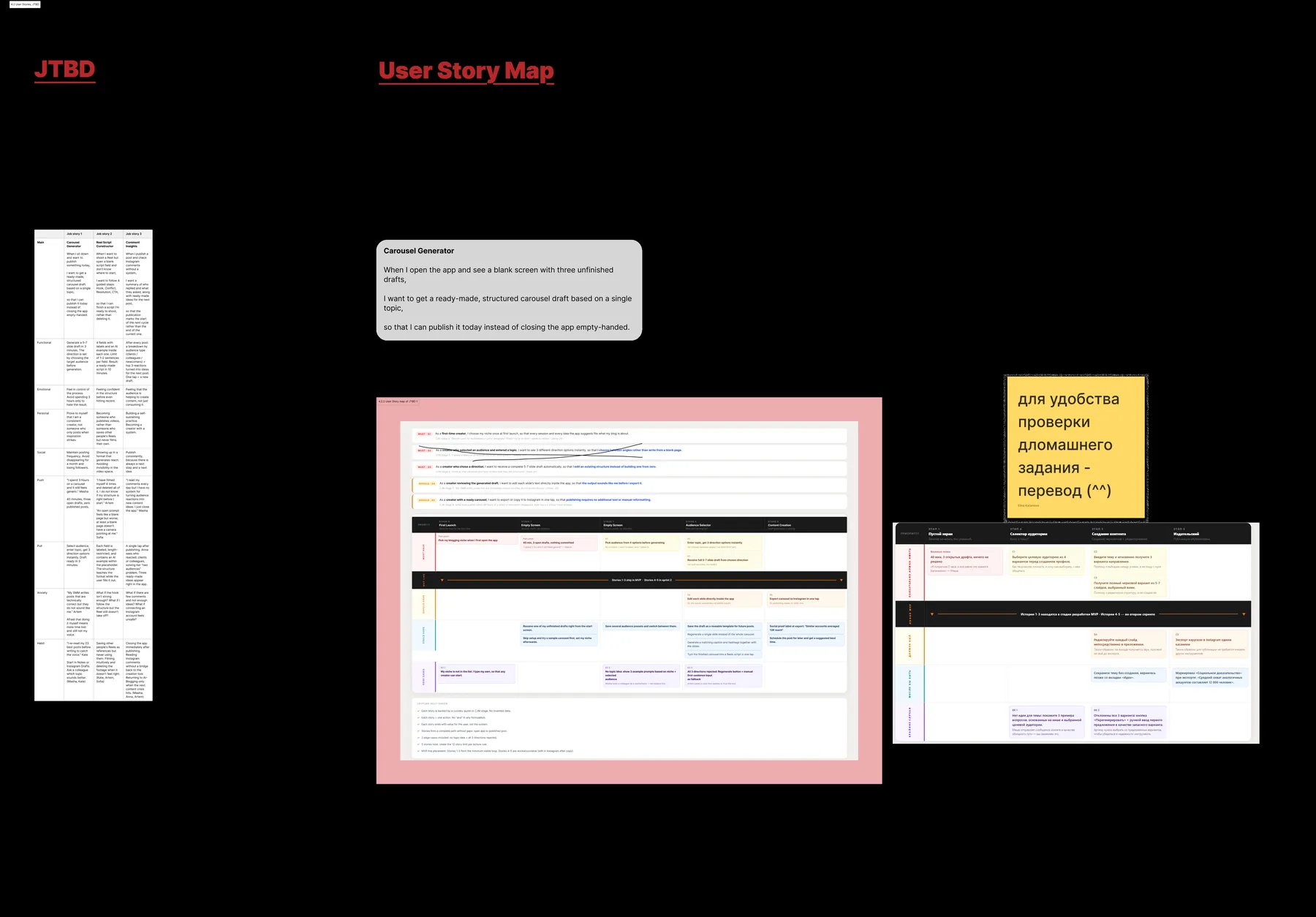
"When I open the app and see a blank screen with three unfinished drafts, I want to get a ready-made, structured carousel draft based on a single topic, so that I can publish it today instead of closing the app empty-handed."
Three JTBD were written from the interview data; the core one was expanded into a user story map — backbone activities, walking skeleton, release slices — which became the direct input for the task flows.Drei JTBD aus den Interviewdaten; der Kern-Job wurde zur User Story Map ausgebaut — Backbone, Walking Skeleton, Release-Slices — der direkte Input für die Task Flows.
08Task flow → user flow → wireflowTask Flow → User Flow → Wireflow
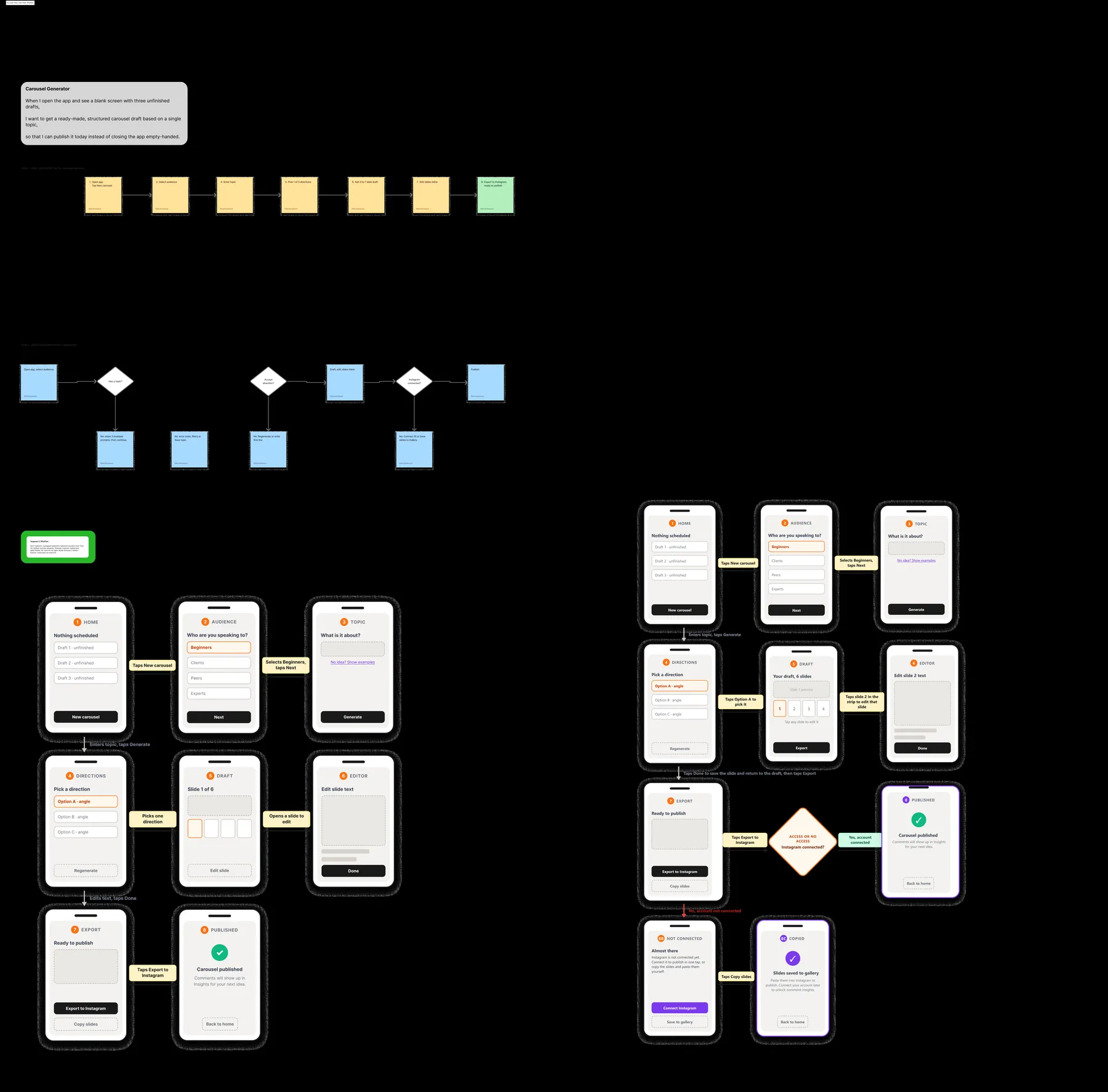
The core job was planned in three passes: a linear task flow, a user flow with decision points and error branches, then a wireflow on real wireframes. The first wireflow is still on the board — crossed out. Reviewing it against the CJM exposed dead ends (an unnecessary settings detour before first value, a confirmation that added nothing), and the "Changes" version fixed them before any hi-fi pixel existed. Cheap mistakes are the point of this stage.
Der Kern-Job wurde in drei Durchgängen geplant: linearer Task Flow, User Flow mit Entscheidungspunkten und Fehler-Zweigen, dann Wireflow auf echten Wireframes. Der erste Wireflow hängt noch am Board — durchgestrichen. Der Review gegen das CJM zeigte Sackgassen (ein unnötiger Settings-Umweg vor dem ersten Wert, eine Bestätigung ohne Funktion); die „Changes"-Version behob sie, bevor ein Hi-Fi-Pixel existierte. Billige Fehler sind der Sinn dieser Phase.
09Metrics map — how success would be measuredMetrik-Karte — wie Erfolg gemessen würde
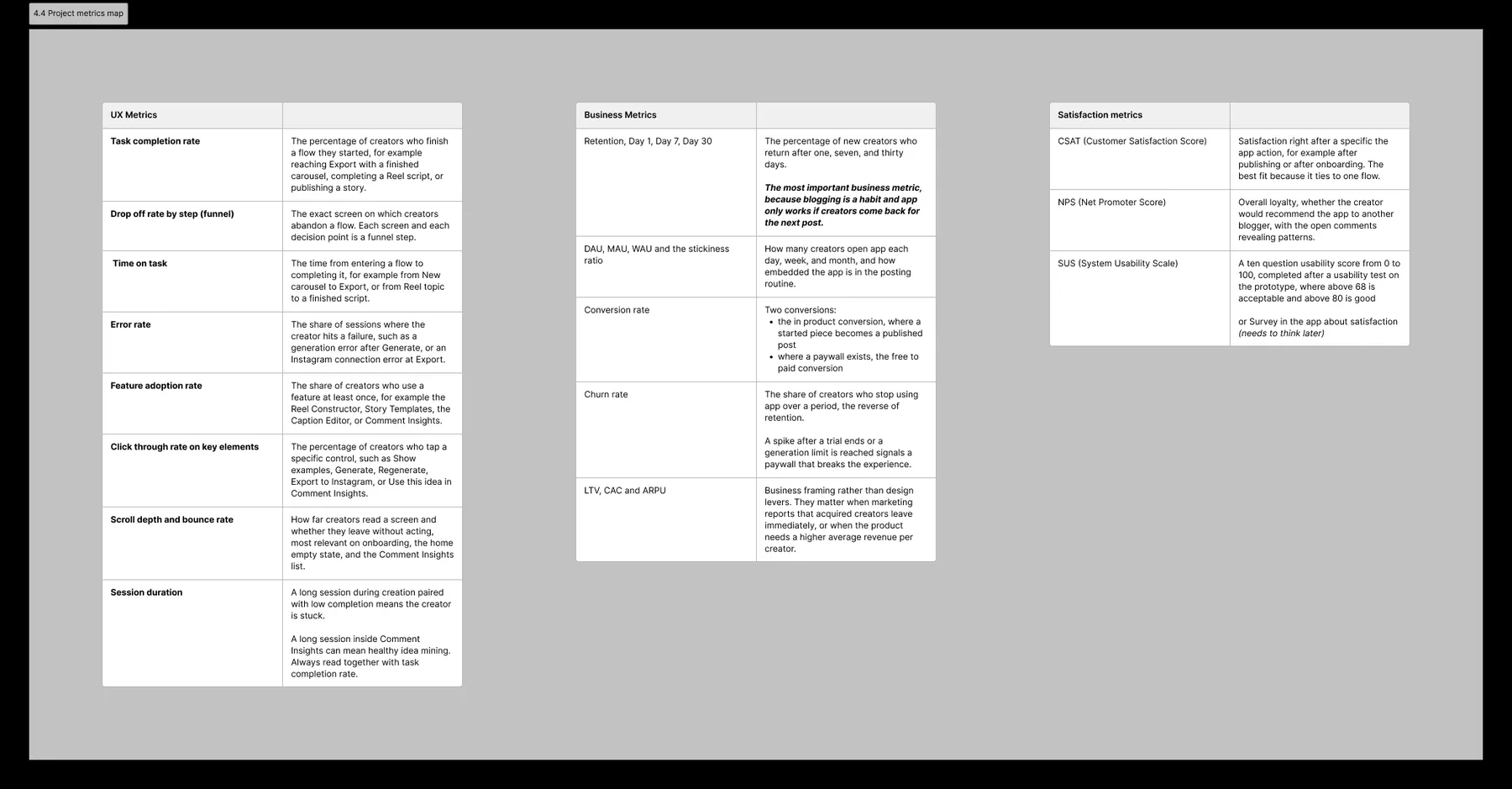
| LayerEbene | What's trackedWas gemessen wird |
|---|---|
| UX | task completion rate · funnel drop-off per step · time on task · error rate · feature adoption · click-through on key elementsTask Completion Rate · Funnel-Drop-off je Schritt · Time on Task · Fehlerrate · Feature Adoption · Click-through auf Kern-Elemente |
| Business | Retention D1/D7/D30 — the north-star: blogging is a habit, the app only works if creators come back for the next post · DAU/WAU/MAU stickiness · free→paid conversion · churn · LTV/CAC/ARPURetention D1/D7/D30 — der North Star: Bloggen ist eine Gewohnheit, die App funktioniert nur, wenn Creator für den nächsten Post wiederkommen · DAU/WAU/MAU-Stickiness · Free→Paid-Conversion · Churn · LTV/CAC/ARPU |
| Satisfaction | CSAT · NPS · SUS (usability test on the prototype)(Usability-Test am Prototyp) |
The UX metrics were revisited and corrected once the wireframes existed — measuring plans have to survive contact with real screens.Die UX-Metriken wurden nach den Wireframes erneut geprüft und korrigiert — Messpläne müssen den Kontakt mit echten Screens überleben.
10Moodboard & paper sketchesMoodboard & Papier-Skizzen
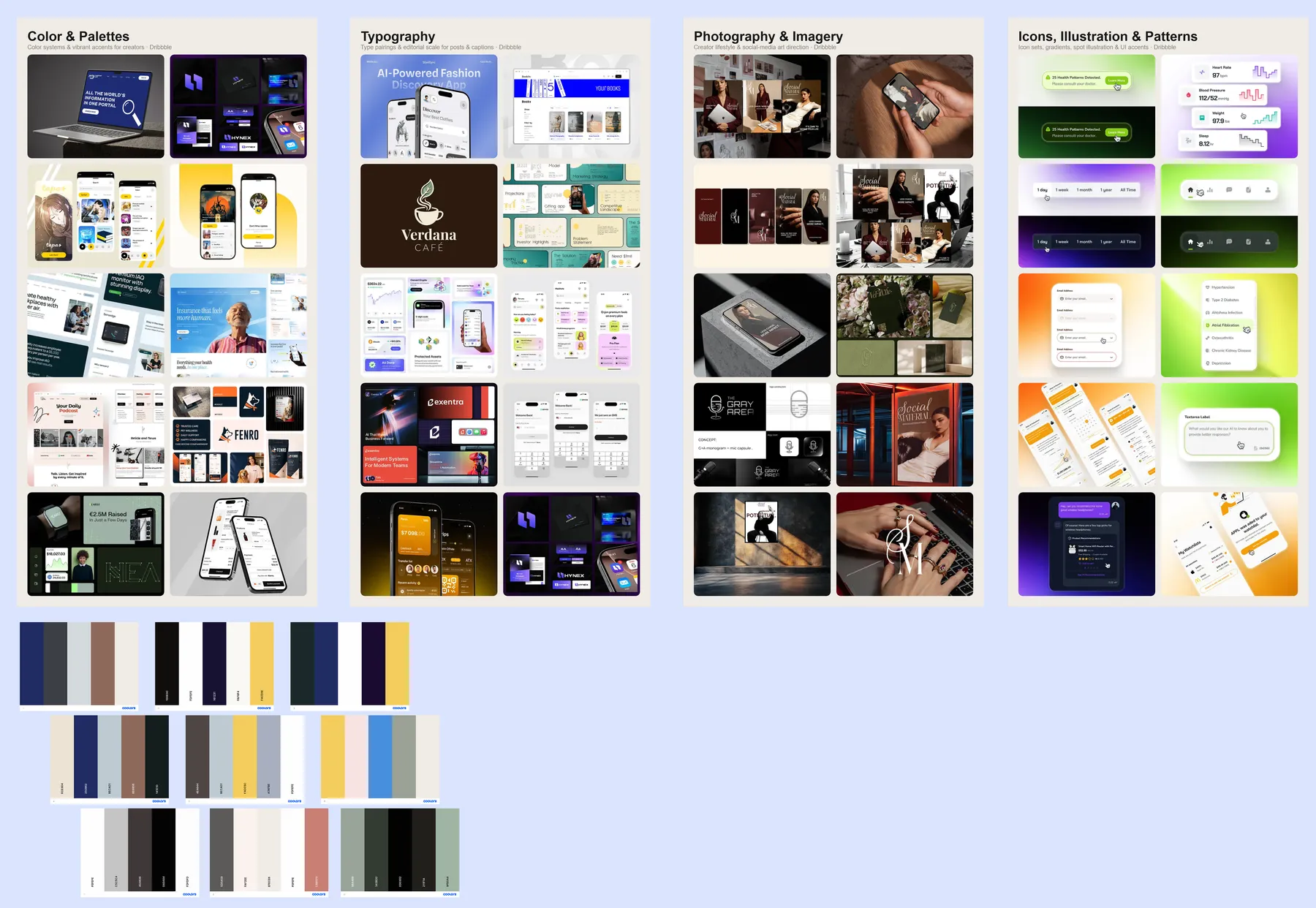
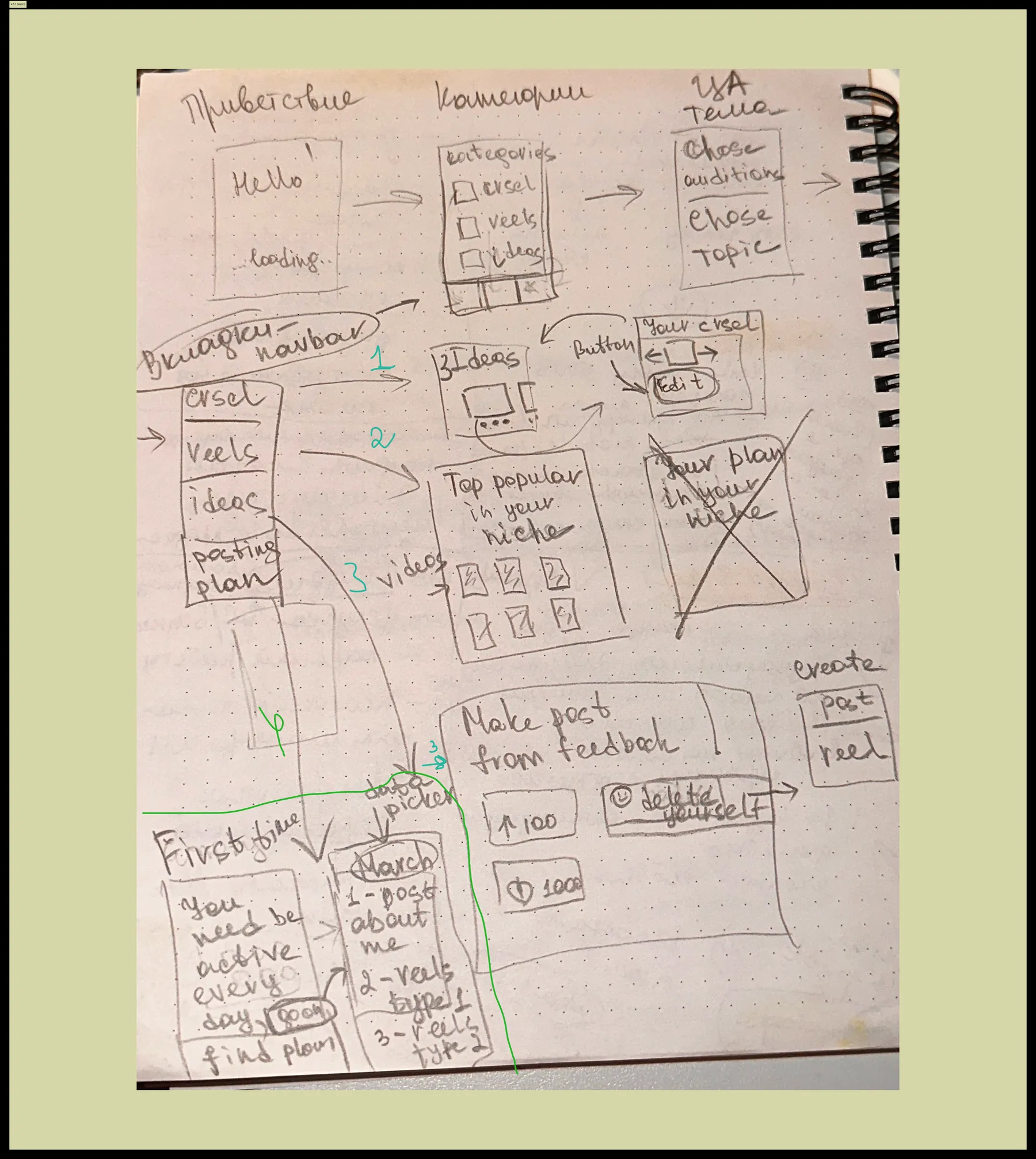
A moodboard of carousel- and reels-maker UIs, organized by color & palettes, typography, photography & imagery, icons & patterns — the argument for the dark editorial direction. Next to it: the very first screens, sketched on paper (sketches ↗Skizzen ↗) — navbar, categories, "make post from feedback", the creation loop — before any tool was opened.
Ein Moodboard von Carousel- und Reels-Maker-UIs, sortiert nach Farben & Paletten, Typografie, Fotografie & Bildwelt, Icons & Patterns — das Argument für die Dark-Editorial-Richtung. Daneben: die allerersten Screens, auf Papier skizziert (Skizzen ↗Skizzen ↗) — Navbar, Kategorien, „Post aus Feedback", der Creation-Loop — bevor ein Tool geöffnet wurde.
11Wireframes, UX copy & clickable prototypeWireframes, UX-Texte & klickbarer Prototyp
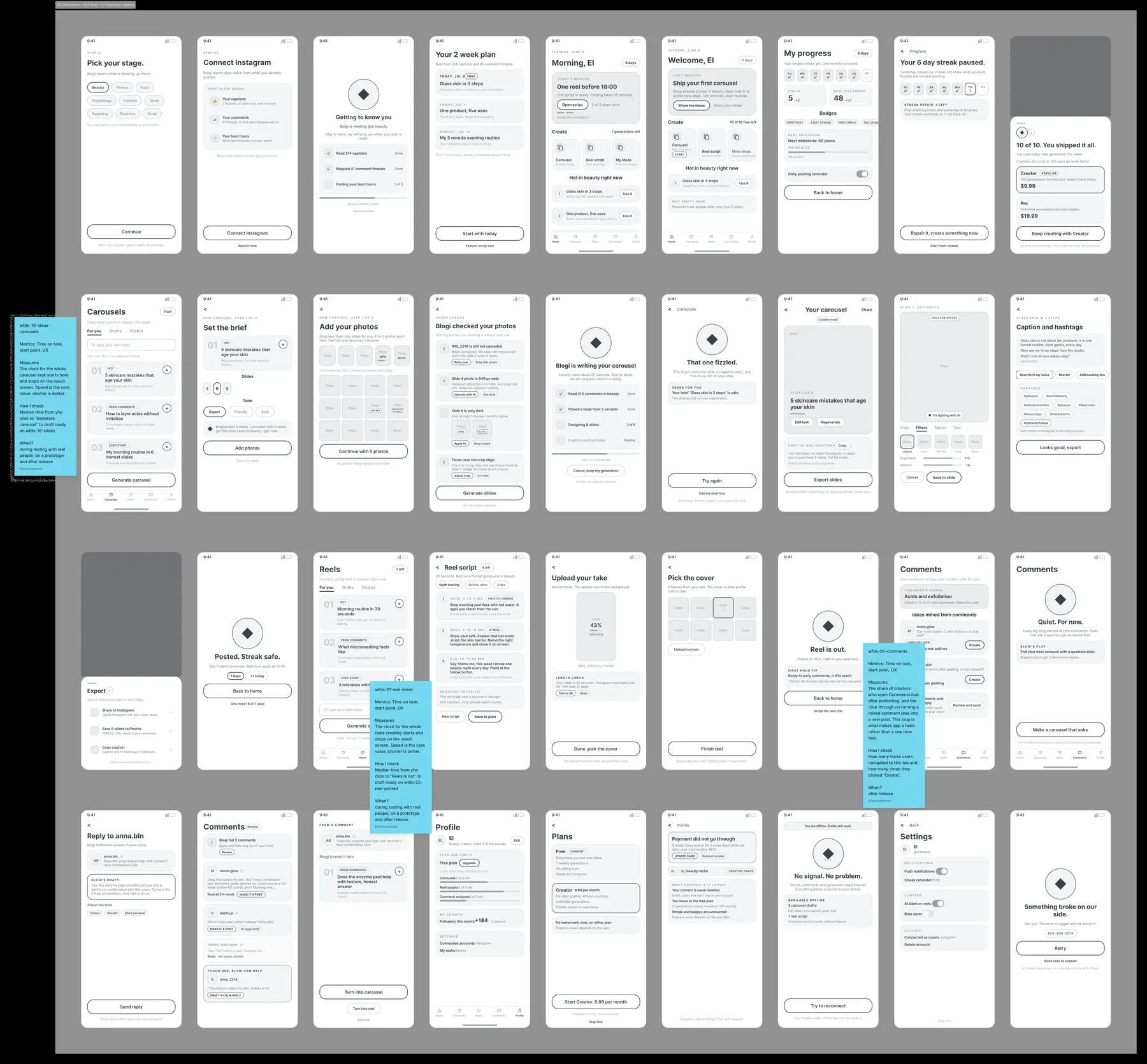
The wireflow grew into a full wireframe set, then an extended one ("adding more screens" — states, errors, limits). UX texts were written on the wireframes as annotations — no shame patterns, honest limits, buttons that say what happens. The set was wired into a clickable prototype for walkthroughs, and a separate draft page ↗Draft-Seite ↗ holds the full 36-screen wireframe draft.
Aus dem Wireflow wurde ein vollständiges Wireframe-Set, dann ein erweitertes („adding more screens" — States, Fehler, Limits). UX-Texte entstanden als Annotationen direkt auf den Wireframes — keine Shame-Patterns, ehrliche Limits, Buttons, die sagen, was passiert. Das Set wurde zum klickbaren Prototyp verdrahtet; eine separate Draft-Seite ↗Draft-Seite ↗ hält den vollen 36-Screen-Wireframe-Entwurf.
12Design system — dark editorial, iOS-nativeDesignsystem — Dark Editorial, iOS-nativ
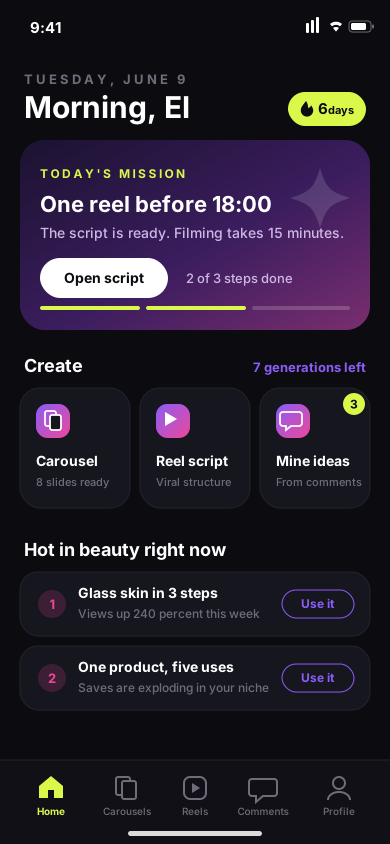
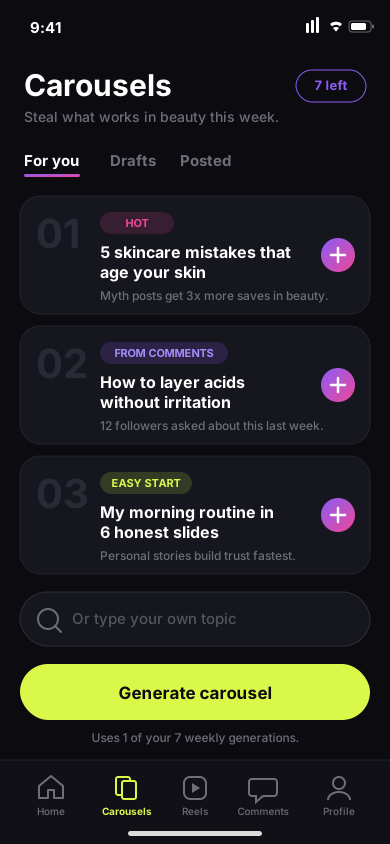
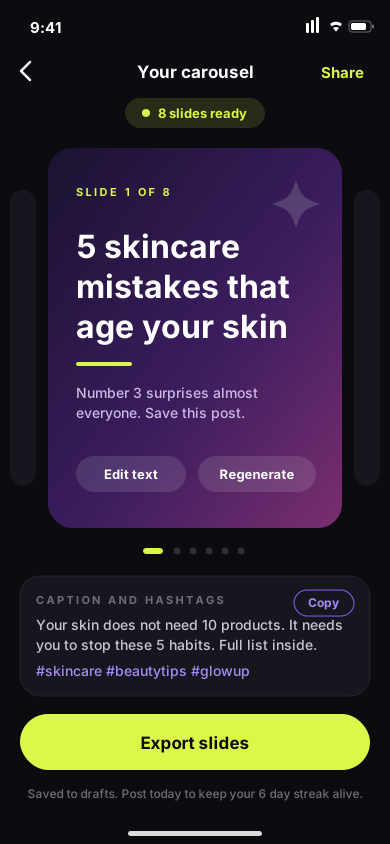
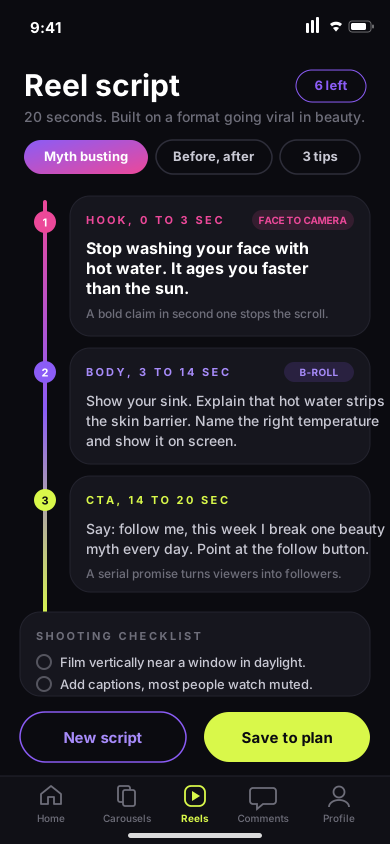
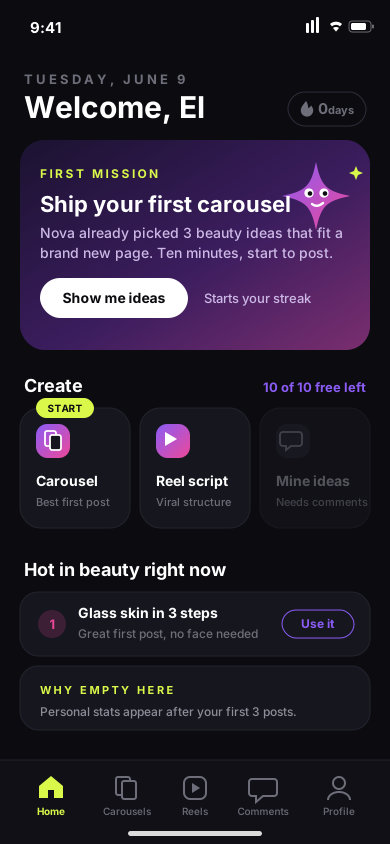
Oversized 800-weight editorial titles, ghost numbers behind cards, 20px card radius, kicker labels in electric lime, gradient reserved for primary CTAs. iOS-native throughout: SF Pro, status bar, home indicator, sheets and tab-bar patterns per HIG.Editoriale 800er-Titel, Ghost-Nummern hinter Karten, 20px Kartenradius, Kicker in Electric Lime, Gradient nur für primäre CTAs. Durchgehend iOS-nativ: SF Pro, Statusbar, Home-Indicator, Sheets und Tab-Bar-Patterns nach HIG.
13Key screens — the working loopKern-Screens — der Arbeits-Loop
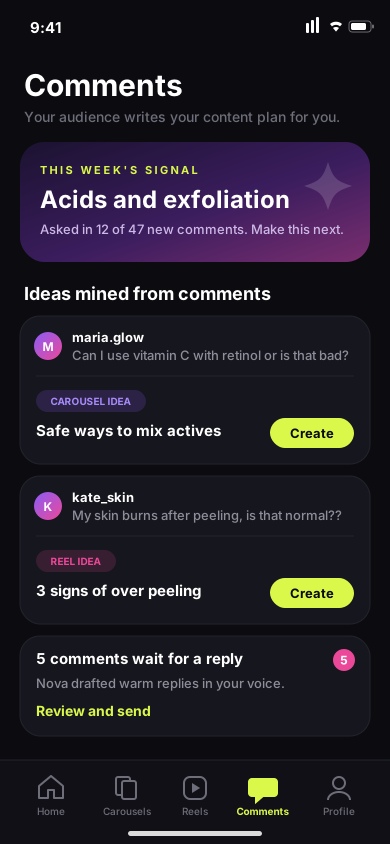
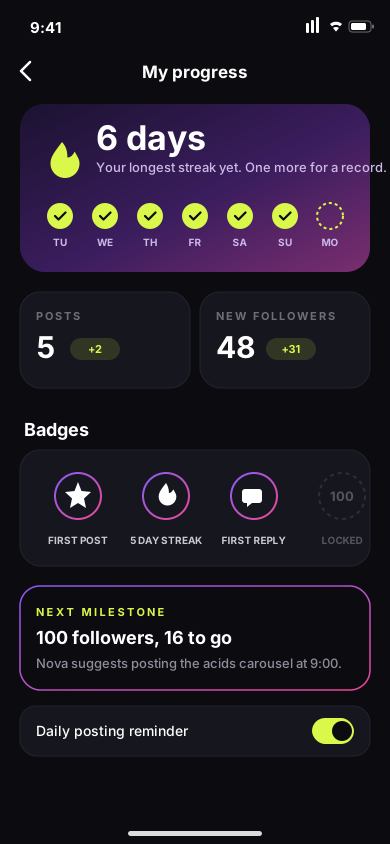
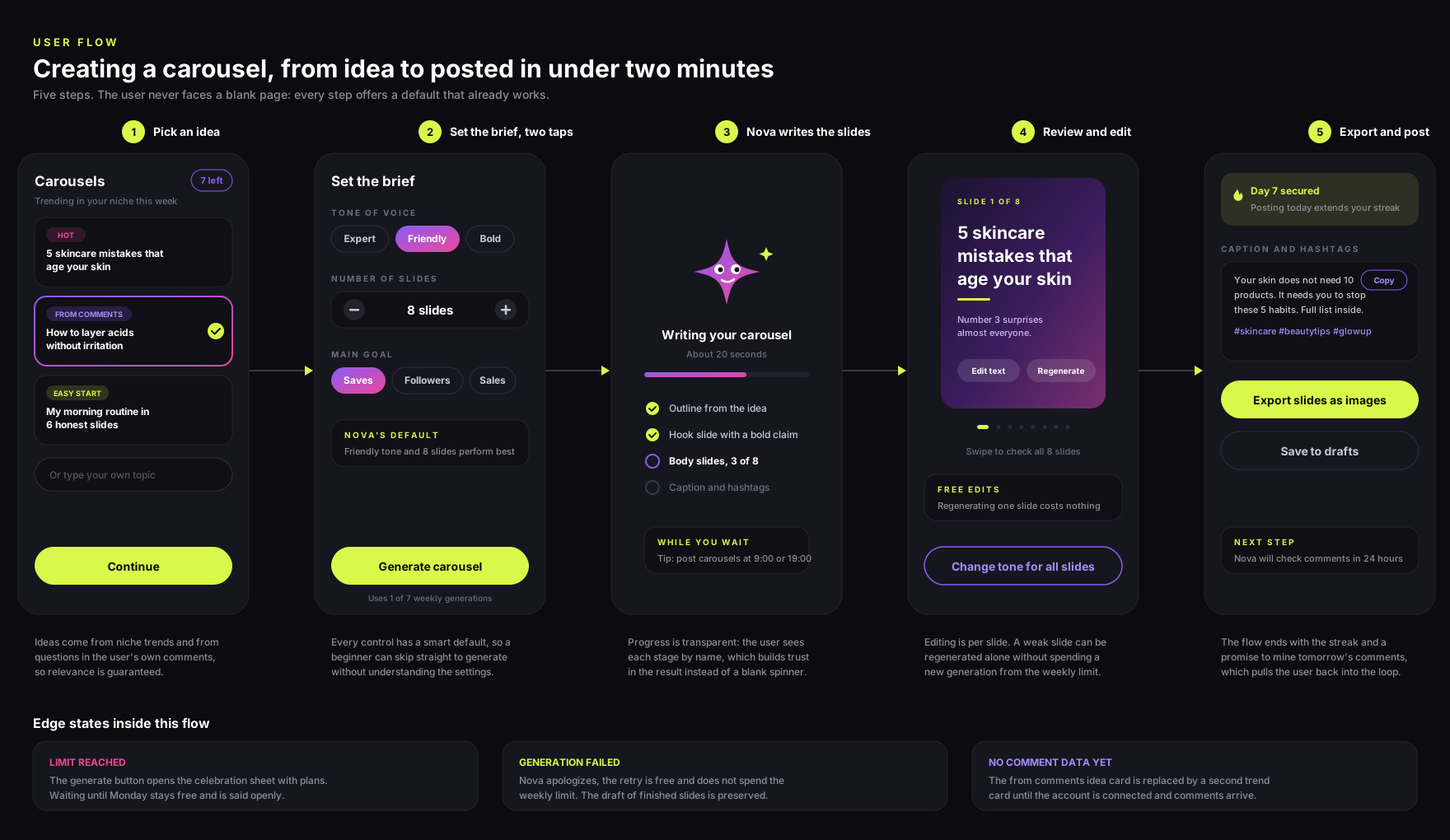
14Grey zones — where AI products earn trustGrauzonen — wo AI-Produkte Vertrauen verdienen
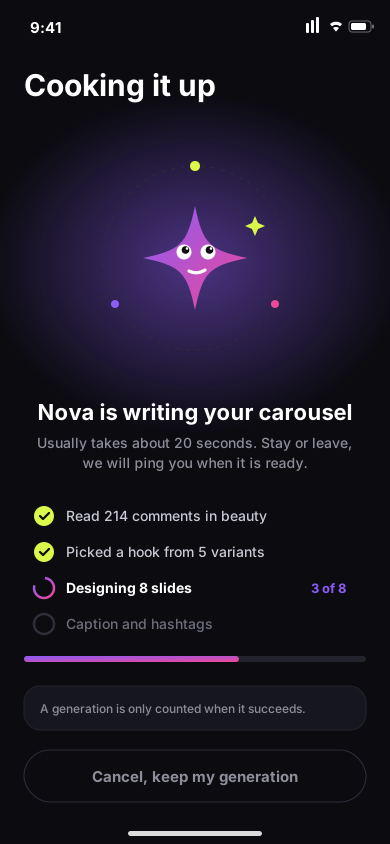
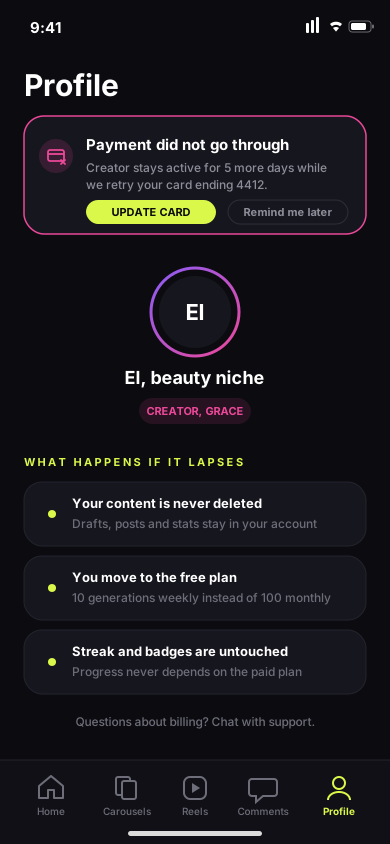
An AI product fails visibly and often — generation errors, limits, offline. Every unhappy path got first-class design, and Nova carries the tone: honest about what went wrong, always offering a way forward.
Ein AI-Produkt scheitert sichtbar und oft — Generierungsfehler, Limits, offline. Jeder Unhappy Path bekam vollwertiges Design, und Nova trägt den Ton: ehrlich über das Problem, immer mit einem Weg nach vorn.
15The AI pipeline — Figma built by plugins I shipped with AIDie AI-Pipeline — Figma, gebaut von Plugins, die ich mit AI erstellt habe
The unusual part isn't the screens — it's how they were made. Together with AI I wrote a family of Figma dev plugins that programmatically built the design system and the screens: a color DS with ~66 components, a wireframe kit, and two instance-based screen sets rebuilt from components at the push of a button.
Das Ungewöhnliche sind nicht die Screens — sondern wie sie entstanden. Zusammen mit AI habe ich eine Familie von Figma-Dev-Plugins geschrieben, die Designsystem und Screens programmatisch gebaut haben: ein Farb-DS mit ~66 Komponenten, ein Wireframe-Kit und zwei instanzbasierte Screen-Sets, per Knopfdruck aus Komponenten neu generierbar.
| # | Plugin | What it doesWas es tut |
|---|---|---|
| 1 | Design-system builderDesignsystem-Builder | the design system was specified with Claude, then the plugin generated it inside Figma: tokens, styles and ~66 componentsdas Designsystem wurde mit Claude spezifiziert, dann hat das Plugin es in Figma generiert: Tokens, Styles und ~66 Komponenten |
| 2 | Screen assemblerScreen-Assembler | builds the screens of my flows on top of the generated DS components — every block on every screen is an instance, not a copybaut die Screens meiner Flows auf den generierten DS-Komponenten auf — jeder Block jedes Screens ist eine Instanz, keine Kopie |
| 3 | Auto-layout wrapper | wraps the assembled screens into proper auto-layout — the difference between "pixels that look right" and layouts that behave rightverpackt die Screens in sauberes Auto-Layout — der Unterschied zwischen „Pixeln, die richtig aussehen" und Layouts, die sich richtig verhalten |
| 4 | PrototyperPrototyper | wires the screens into a clickable prototype — 120 prototype links applied programmaticallyverdrahtet die Screens zum klickbaren Prototyp — 120 Prototyp-Links, programmatisch gesetzt |
The loop for each plugin: spec written in plain language → Claude writes the plugin code → loaded into Figma via developer mode → run on the file → errors and API quirks fed back to Claude → re-run. Each plugin is idempotent, so re-running is always safe.Der Loop je Plugin: Spezifikation in Klartext → Claude schreibt den Plugin-Code → Laden in Figma über den Developer-Modus → Lauf auf der Datei → Fehler und API-Eigenheiten zurück an Claude → erneuter Lauf. Jedes Plugin ist idempotent — ein erneuter Lauf ist immer sicher.
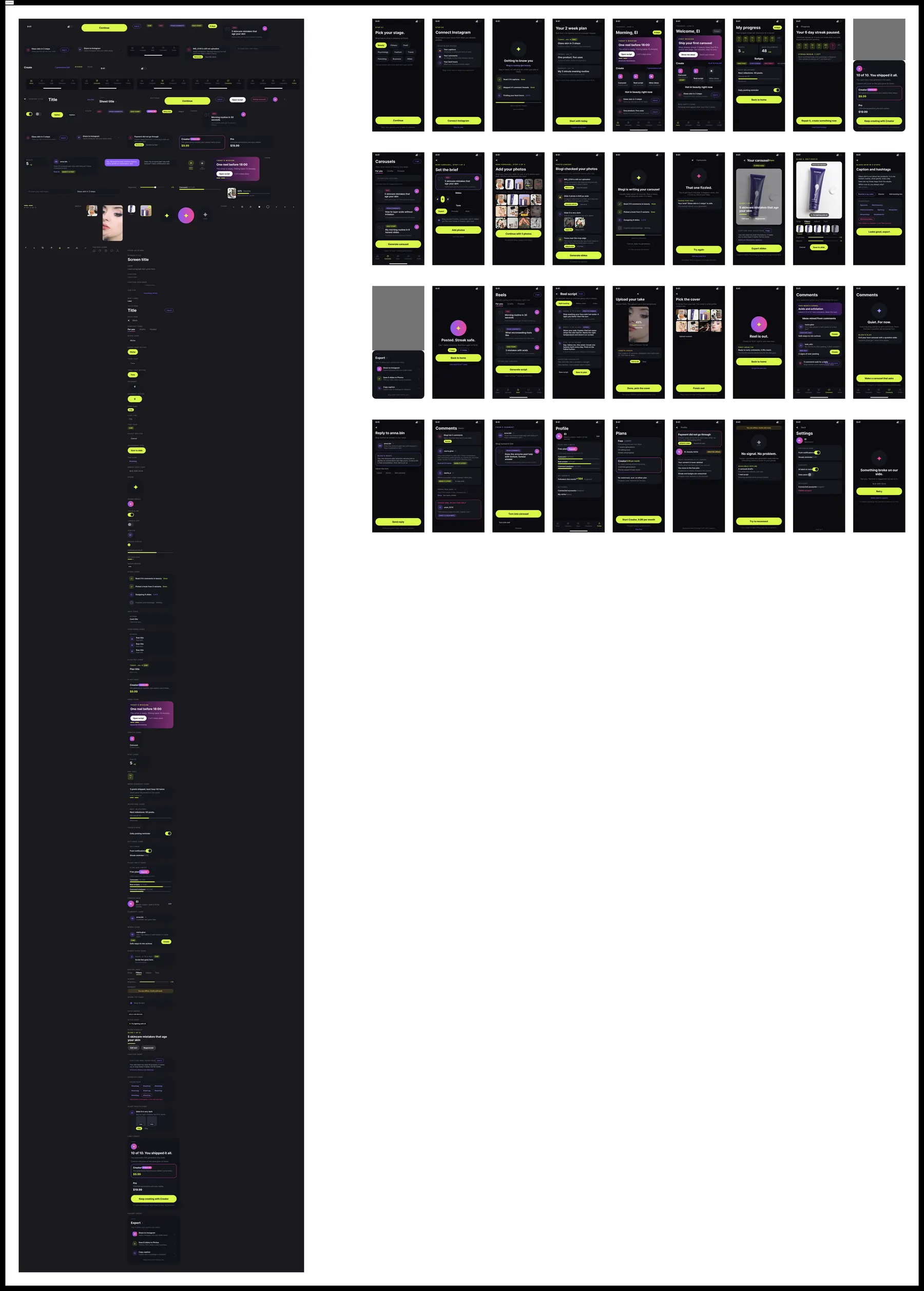
Before: wireframe screens as plain frames — no auto-layout, no components, every element loose. After: the same screens rebuilt by the plugin chain — wrapped in auto-layout, every block a component instance linked to the design system, prototype connections wired between screens. Change a DS component and every screen updates; stretch a screen and the layout reflows instead of breaking.
Vorher: Wireframe-Screens als lose Frames — kein Auto-Layout, keine Komponenten, jedes Element einzeln. Nachher: dieselben Screens, neu gebaut von der Plugin-Kette — in Auto-Layout verpackt, jeder Block eine mit dem Designsystem verknüpfte Instanz, Prototyp-Verbindungen zwischen den Screens. Eine DS-Komponente ändern — alle Screens ziehen nach; einen Screen strecken — das Layout fließt, statt zu brechen.
| ClusterCluster | ContentsInhalt |
|---|---|
| Hi-fi originals | 36 dark editorial screens + "Components" DS frameDark-Editorial-Screens + „Components"-DS-Frame |
| Wireframe originals | 36 B/W screens + wireframe component kitS/W-Screens + Wireframe-Kit |
| Instance-based wireframes | 36 screens where every block is a component instance · 116 wired prototype links36 Screens, jeder Block eine Komponenten-Instanz · 116 verdrahtete Prototyp-Links |
| Instance-based hi-fi | 36 screens rebuilt from DS atoms · 120 wired links · one-click regeneration36 Screens aus DS-Atomen · 120 verdrahtete Links · Ein-Klick-Regeneration |
Why it matters: the design system isn't documentation — it's executable. Change a component, re-run the plugin, and all 36 screens rebuild consistently. That's design-system discipline enforced by code.Warum das zählt: Das Designsystem ist keine Doku — es ist ausführbar. Komponente ändern, Plugin laufen lassen, alle 36 Screens bauen sich konsistent neu. Designsystem-Disziplin, durch Code erzwungen.