Research as the operating system. As sole designer & researcher I ran 30 interviews, two quantitative surveys (n=241 and n=252), a randomized 3-variant split-test and a color-coding experiment — and every shipped feature traces back to a validated hypothesis. Year-one goals for downloads and active use were met; the retention miss (~50% vs 65%) became the next cycle's starting hypothesis, stated honestly.
Research als Betriebssystem. Als alleinige Designerin & Researcherin: 30 Interviews, zwei quantitative Umfragen (n=241 und n=252), ein randomisierter 3-Varianten-Split-Test und ein Farbcodierungs-Experiment — jedes ausgelieferte Feature geht auf eine validierte Hypothese zurück. Die Jahresziele für Downloads und aktive Nutzung wurden erreicht; die verfehlte Retention (~50% vs. 65%) wurde ehrlich benannt — als Ausgangshypothese des nächsten Zyklus.
01The problem & framingProblem & Framing
Employees of large enterprises schedule meetings all day — on desktop. Mobile calendars in corporate suites tend to be an afterthought: a read-only mirror of the desktop, opened reluctantly and closed quickly.
Beschäftigte in großen Unternehmen planen den ganzen Tag Meetings — am Desktop. Mobile Kalender in Corporate Suites sind meist ein Nachgedanke: ein Read-only-Spiegel des Desktops, widerwillig geöffnet und schnell wieder geschlossen.
The challenge: in a market saturated with polished calendar apps, make mobile scheduling genuinely useful — not a shrunken desktop, but a tool people reach for on purpose.
Die Herausforderung: In einem Markt voller ausgereifter Kalender-Apps mobiles Planen wirklich nützlich machen — kein geschrumpfter Desktop, sondern ein Werkzeug, zu dem man bewusst greift.
| Question | Risk if we guess | Method chosen |
|---|---|---|
| What do people actually do with a calendar on a phone? | shipping a shrunken desktop | 30 in-depth interviews |
| Which scheduler capabilities matter enough to build? | a feature list from opinions | User Story Mapping → survey, n=241 |
| How should event creation work on a small screen? | copying a competitor's pattern blindly | randomized 3-variant first-click split-test |
| Which notifications deserve priority? | one-size-fits-all push | segment survey, n=252 |
0230 in-depth interviews30 Tiefeninterviews
Interviews on calendar habits, with findings grouped into three fields — Planning, Meetings, Notifications. The strongest signals: people want the whole day at a glance, colleagues' and shared calendars matter, quick rescheduling beats full event creation on mobile — and checking availability on the phone was simply impossible.
Interviews zu Kalender-Gewohnheiten, Erkenntnisse in drei Feldern — Planung, Meetings, Benachrichtigungen. Die stärksten Signale: der ganze Tag auf einen Blick, Kalender von Kollegen und geteilte Kalender zählen, schnelles Verschieben schlägt vollständige Terminerstellung am Handy — und Verfügbarkeiten mobil zu prüfen war schlicht unmöglich.
Method notesMethodische Notizen
Semi-structured interviews across roles and seniority within enterprise customers; coded into the three fields above. Each field later received its own quantitative validation — interviews set the direction, numbers earned the roadmap.
Semistrukturierte Interviews über Rollen und Senioritätsstufen bei Enterprise-Kunden; codiert in die drei Felder oben. Jedes Feld erhielt später eine eigene quantitative Validierung — Interviews gaben die Richtung vor, Zahlen verdienten die Roadmap.
03Competitor teardownWettbewerbs-Teardown
Outlook, Google Calendar and Apple Calendar mapped the baseline users already carry in their pocket — the bar an enterprise calendar must clear before anyone opens it twice.
Outlook, Google Calendar und Apple Calendar kartierten die Messlatte, die Nutzer ohnehin in der Tasche tragen — die ein Enterprise-Kalender überspringen muss, bevor ihn jemand zweimal öffnet.
| Day at a glance | Quick reschedule | Availability on mobile | Shared calendars | Enterprise permissions | |
|---|---|---|---|---|---|
| Outlook mobile | busy view | edit form | partial | yes | yes |
| Google Calendar | strong | drag | workspace only | yes | basic |
| Apple Calendar | strong | drag | — | personal | — |
| Our calendar | grid + now-line | slot-based | per-participant busy view | yes | role-based |
04Scheduler survey — n=241Scheduler-Umfrage — n=241
The meeting scheduler ("propose a time") was the riskiest bet — so it got the heaviest validation: a quantitative survey with 241 respondents (120 internal, 121 external).
Der Meeting-Scheduler („Zeit vorschlagen") war die riskanteste Wette — also bekam er die schwerste Validierung: eine quantitative Umfrage mit 241 Teilnehmenden (120 intern, 121 extern).
| Capability | Internal | External | Verdict |
|---|---|---|---|
| View available slots | 92% overall | phase 1 | |
| Propose a different meeting time | 96% | 95% | phase 1 |
| Colleague availability statuses | 93% | 88% | phase 1 |
Where the 9 hypothesis groups came fromWoher die 9 Hypothesengruppen kamen
A User Story Mapping workshop with developers, QA and the product owner turned assumptions into 9 testable hypothesis groups. The survey ranked them; the result was a phased roadmap — phase 1: slot suggestions plus a per-participant busy view. Features that didn't earn their numbers waited.
Ein User-Story-Mapping-Workshop mit Entwicklern, QA und Product Owner machte aus Annahmen 9 testbare Hypothesengruppen. Die Umfrage priorisierte sie; das Ergebnis war eine phasierte Roadmap — Phase 1: Slot-Vorschläge plus Belegt-Ansicht pro Teilnehmer. Features ohne verdiente Zahlen warteten.
05Research behind every featureResearch hinter jedem Feature
Research wasn't a phase that ended before design started — it was bundled per feature. A typical feature carried its own study chain: plan → results → analysis → usability session → implementation review. The archive still holds every document.
Research war keine Phase, die vor dem Design endete — er war pro Feature gebündelt. Ein typisches Feature trug seine eigene Studienkette: Plan → Ergebnisse → Analyse → Usability-Session → Implementation Review. Das Archiv enthält bis heute jedes Dokument.
| Feature | Studies in the bundle |
|---|---|
| Create event by tap on a free slot | survey plan + results — the results document alone runs 35 pages, the largest research doc in the archive |
| Events scheduler | the full loop: research plan → results → analysis → usability session materials → implementation review |
| List of events | interview plan + survey plan + survey results |
| Push notifications | research plan + results (the segment survey in stage 14) |
| Event color coding | color-differentiation studies — a color dataset plus a pathway analysis (feeds stage 13) |
Where the questions came fromWoher die Fragen kamen
A 2024 customer-development cycle — 8 documents across three respondent groups (internal staff, external customers, executive assistants) — fed the calendar backlog with fresh problem evidence, so feature-level studies started from real observed friction, not team opinions.
Ein CustDev-Zyklus 2024 — 8 Dokumente über drei Befragtengruppen (interne Mitarbeitende, externe Kunden, Assistenzen) — speiste das Kalender-Backlog mit frischer Problem-Evidenz. Feature-Studien starteten so bei real beobachteter Reibung, nicht bei Team-Meinungen.
06Story mapping → phased roadmapStory Mapping → phasierte Roadmap
| Phase 1 — earned by data | Phase 2 — validated, queued | Not built — data said no |
|---|---|---|
| Slot suggestions · per-participant busy view · propose-a-time · day view with now-line | Extended recurrence patterns · richer shared-calendar management | Color-coded sections — killed by the SUS experiment (stage 13) |
07JTBD & scenariosJTBD & Szenarien
08Goals & metricsZiele & Metriken
09Foundation — Material 3, day-firstFundament — Material 3, Day-First
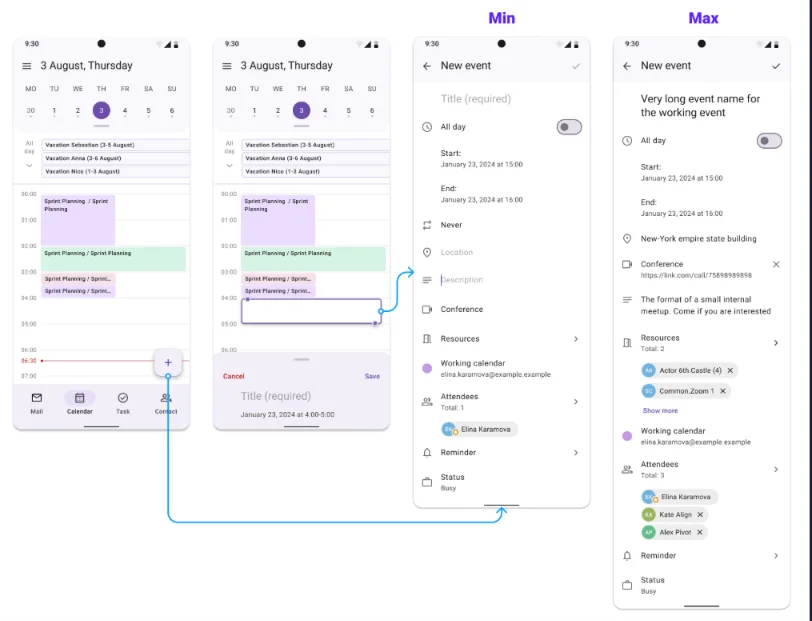
A Material 3-based system. The day view combines an expandable calendar, a time grid and a red current-time line — the whole day at a glance, exactly what the interviews asked for. Swiping between days uses zones sized at 30% of screen width, so the gesture works one-handed without hijacking scrolling.
Ein auf Material 3 basierendes System. Die Tagesansicht kombiniert einen ausklappbaren Kalender, ein Zeitraster und eine rote Jetzt-Linie — der ganze Tag auf einen Blick, genau wie in den Interviews gefordert. Das Wischen zwischen Tagen nutzt Zonen von 30% der Bildschirmbreite — einhändig, ohne das Scrollen zu kapern.
| Decision | Grounding |
|---|---|
| Day view as home, not month | interviews: "whole day at a glance" — month view is orientation, not work |
| Red now-line in the grid | the phone's job is now; desktop's job is the week |
| 30%-width swipe zones | one-handed reach on large phones without breaking vertical scroll |
| Bottom sheets over full-screen forms | keeps day context visible during quick actions — Material 3 pattern |
10Built on Material 3 — nativelyAuf Material 3 gebaut — nativ
Not "Material-inspired" — Material 3 by the book. The team's Mobile Design System (MDS) mirrors the M3 spec: every component is documented the way Google documents its own — Anatomy / States / Design tokens / Usage. I proposed and documented 15 design-system components and introduced design tokens into the workflow.
Nicht „Material-inspiriert" — Material 3 nach Lehrbuch. Das Mobile Design System (MDS) des Teams spiegelt die M3-Spezifikation: Jede Komponente ist so dokumentiert, wie Google die eigenen dokumentiert — Anatomy / States / Design Tokens / Usage. Ich habe 15 Design-System-Komponenten vorgeschlagen und dokumentiert und Design Tokens in den Workflow eingeführt.
| Layer | What's inside |
|---|---|
| 33 M3 UI-kit components | Navigation Bar · Top App Bar · FAB · Bottom sheets · Date & Time Pickers · Snackbar · Chips … — each with Anatomy / States / Design tokens / Usage |
| 11 foundation docs | Color · Typography (incl. Android + iOS platform type) · Elevation · Shape · Layout · Icons · Empty State · Design tokens … |
| Calendar product snippets | Event Snippet · All-day Event Snippets · Creation Event Snippet · Day View · Event Date Picker — the calendar's own composite components, built from the kit |
Why native M3 matters for enterprise AndroidWarum natives M3 für Enterprise-Android zählt
Enterprise users don't get onboarding time — they get five minutes between meetings. Native Material 3 means every gesture, sheet and picker behaves exactly like the rest of their Android phone, so the learning curve collapses to zero. It also means engineers build on platform components instead of custom ones — fewer defects, accessibility states for free, and a design system that survives OS updates instead of fighting them.
Enterprise-Nutzer bekommen keine Onboarding-Zeit — sie bekommen fünf Minuten zwischen Meetings. Natives Material 3 heißt: Jede Geste, jedes Sheet, jeder Picker verhält sich exakt wie der Rest ihres Android-Telefons — die Lernkurve fällt auf null. Und es heißt: Engineers bauen auf Plattform-Komponenten statt auf Eigenbauten — weniger Defekte, Accessibility-States gratis, und ein Design-System, das OS-Updates übersteht, statt gegen sie zu kämpfen.
11The spec archive — 13 UX/UI documents, ~185 pagesDas Spec-Archiv — 13 UX/UI-Dokumente, ~185 Seiten
Enterprise mobile ships on specifications. Every flow got a dedicated [UX_UI] document — states, permissions, edge cases — so engineers and QA never had to guess. Thirteen documents, roughly 185 pages, written and maintained by me.
Enterprise Mobile wird über Spezifikationen ausgeliefert. Jeder Flow bekam ein eigenes [UX_UI]-Dokument — States, Berechtigungen, Edge Cases — damit Engineers und QA nie raten mussten. Dreizehn Dokumente, rund 185 Seiten, von mir geschrieben und gepflegt.
| Spec | What it covered |
|---|---|
| Create & edit event | full form, field validation, save/discard states |
| Create event by tap on a free time slot | the survey-validated quick-create path (stage 05) |
| Viewing a calendar event | 24 pages — the largest spec: every field, role and state of the event card |
| List of events | list states, grouping, empty and loading states |
| Event scheduler | slot suggestions, per-participant busy view |
| Answer / response to event | accept · decline · tentative · propose-a-time flows |
| View attachments in event | attachment types, preview and error states |
| Recurrent events | recurrence patterns and how instances inherit changes |
| Delete single event | destructive flow with role-aware confirmations |
| Delete series | its own spec — deleting a series has different edge cases than deleting one event |
| Delete event from series | the third deletion spec: removing one instance without breaking the series |
| Local notifications | on-device reminders, timing and permission states |
| Mail-server notifications | server-driven notifications and their sync behavior |
Why deletion needed three separate specsWarum das Löschen drei eigene Specs brauchte
"Delete" sounds like one feature — it's three. Deleting a single event, deleting a whole series and removing one instance from a series each have different permission rules, different confirmation language and different failure modes. Folding them into one document is how calendars end up silently deleting a year of meetings; splitting them is how QA catches it first.
„Löschen" klingt wie ein Feature — es sind drei. Einen einzelnen Termin löschen, eine ganze Serie löschen und eine Instanz aus einer Serie entfernen haben je andere Berechtigungsregeln, andere Bestätigungstexte und andere Fehlermodi. Wer sie in ein Dokument faltet, riskiert Kalender, die still ein Jahr an Meetings löschen; wer sie trennt, lässt QA es zuerst finden.
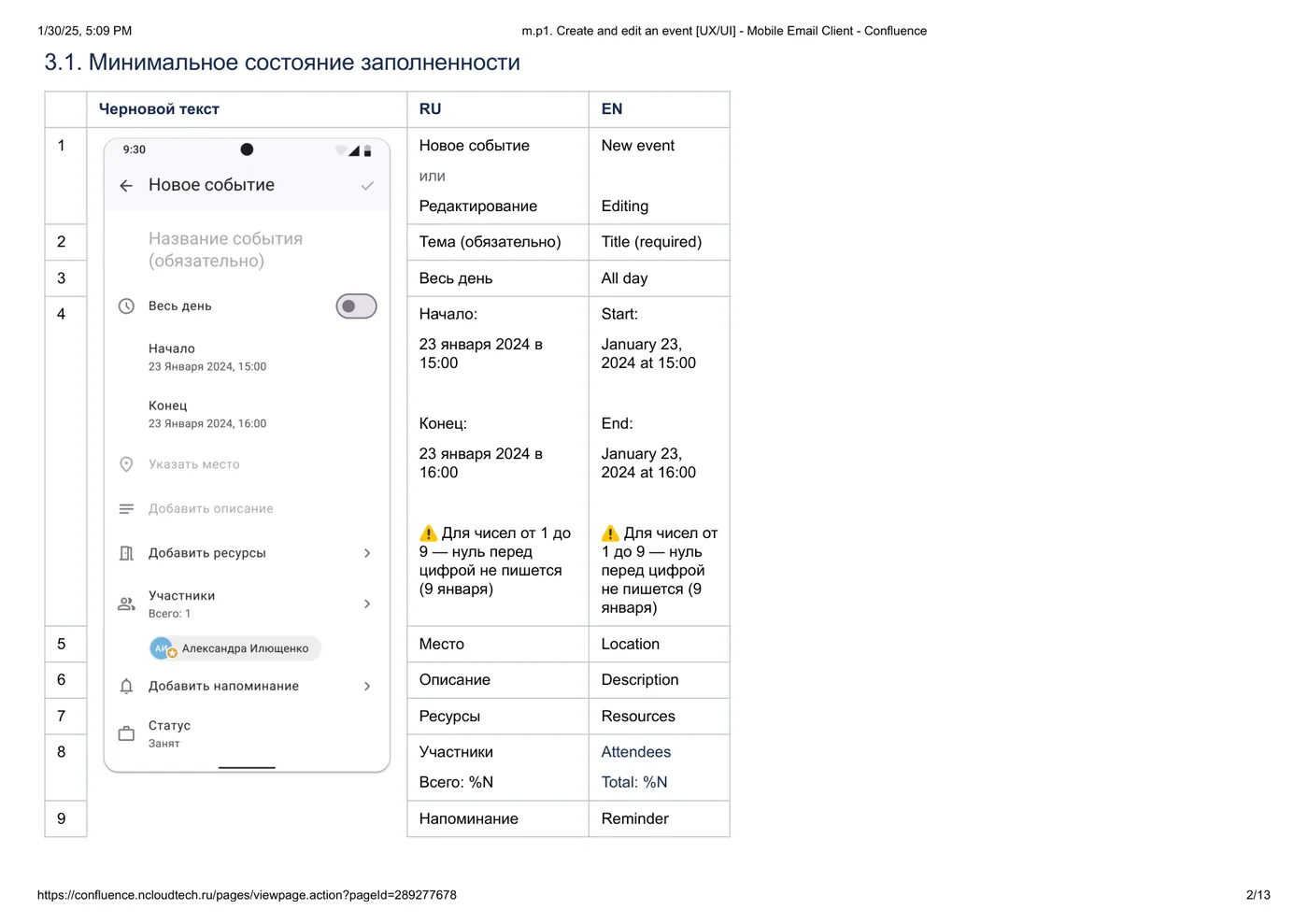
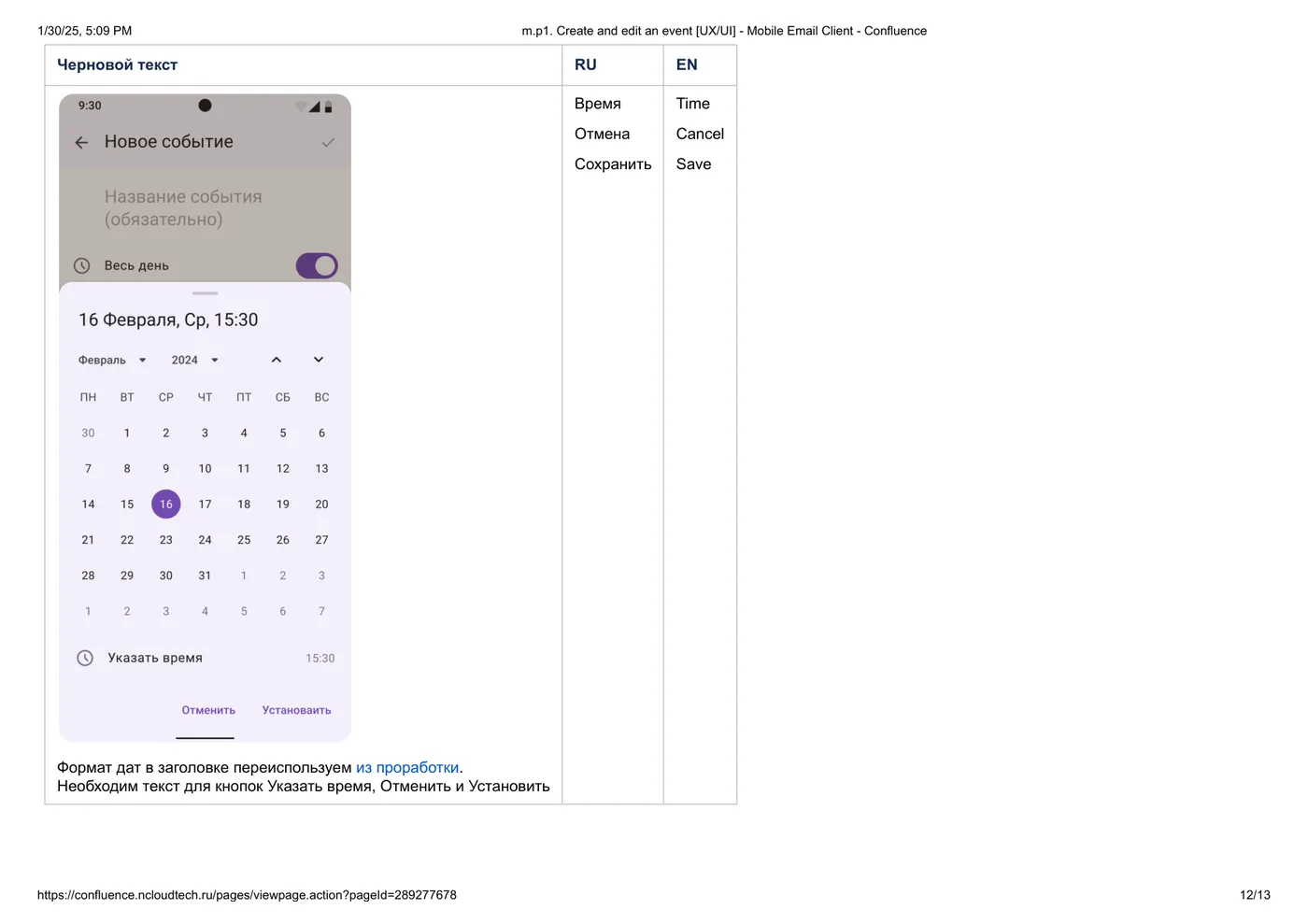
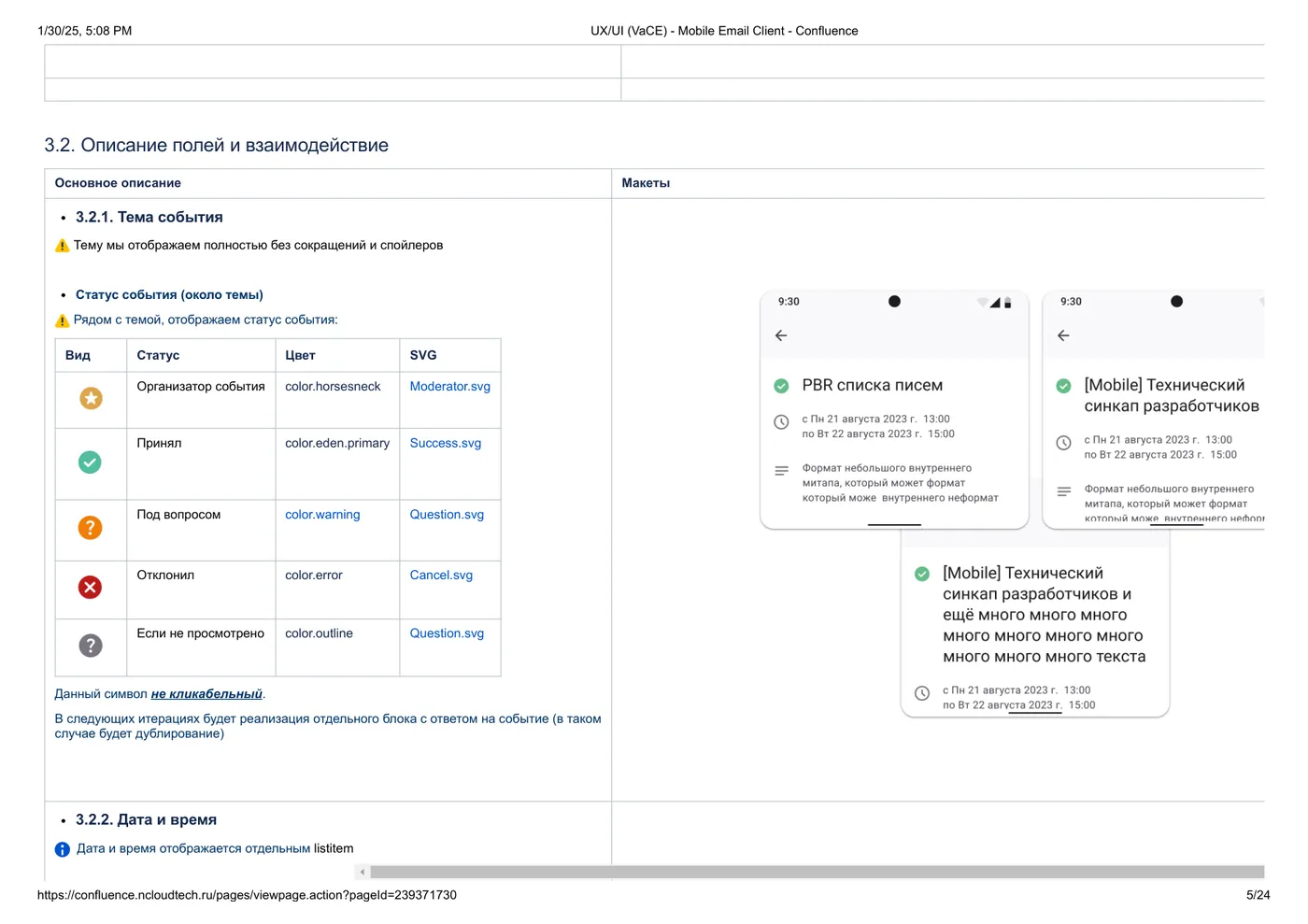
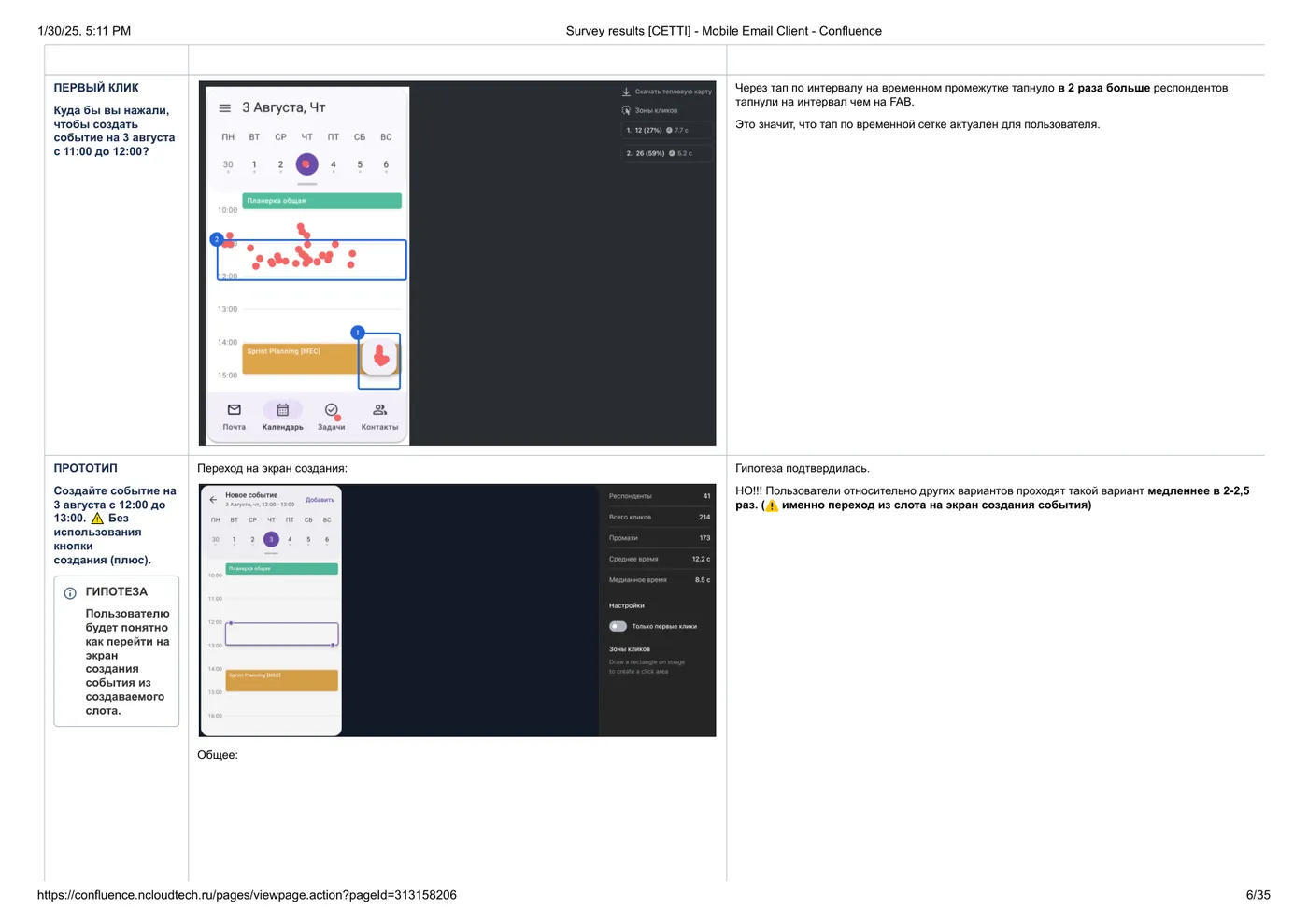
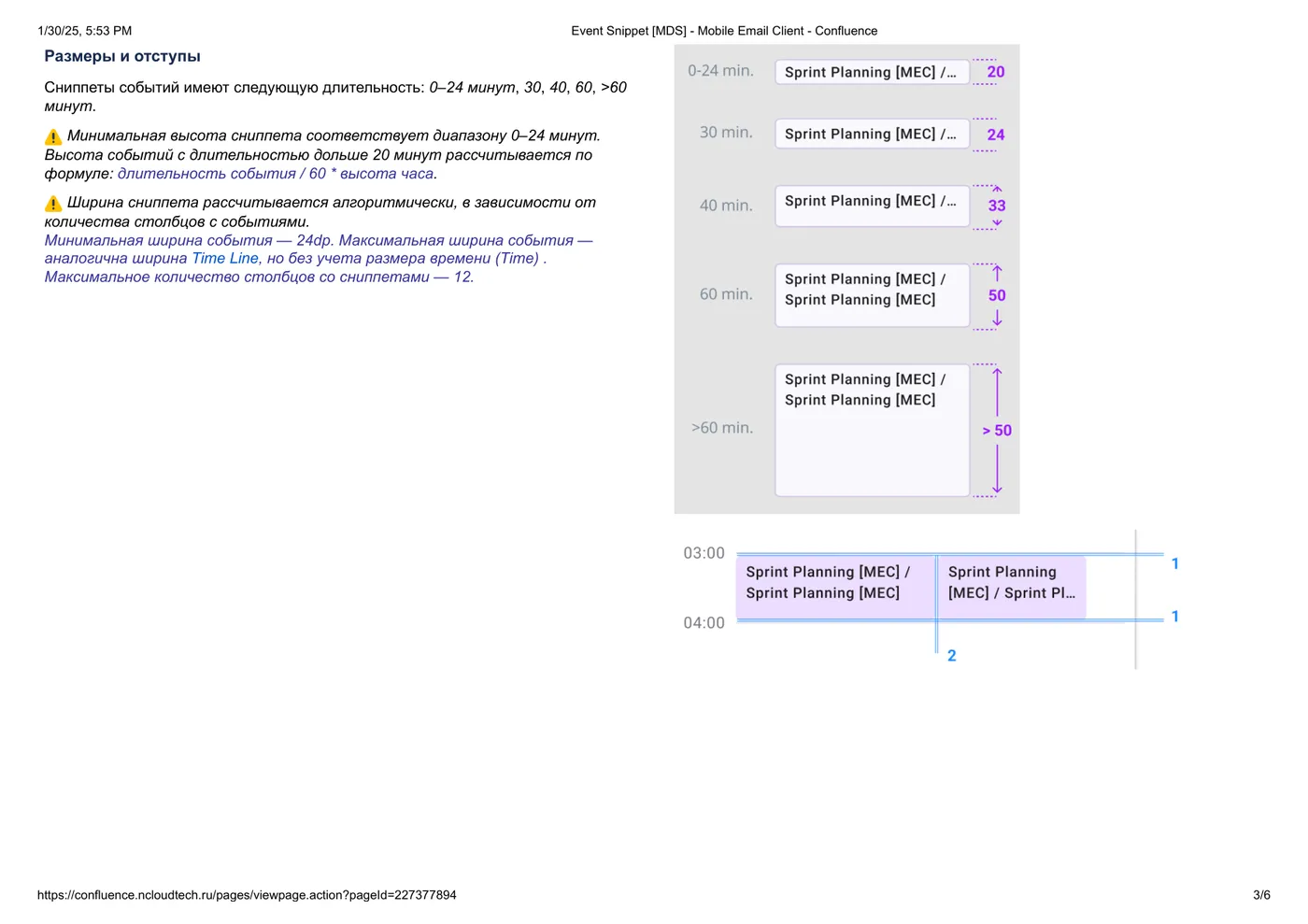
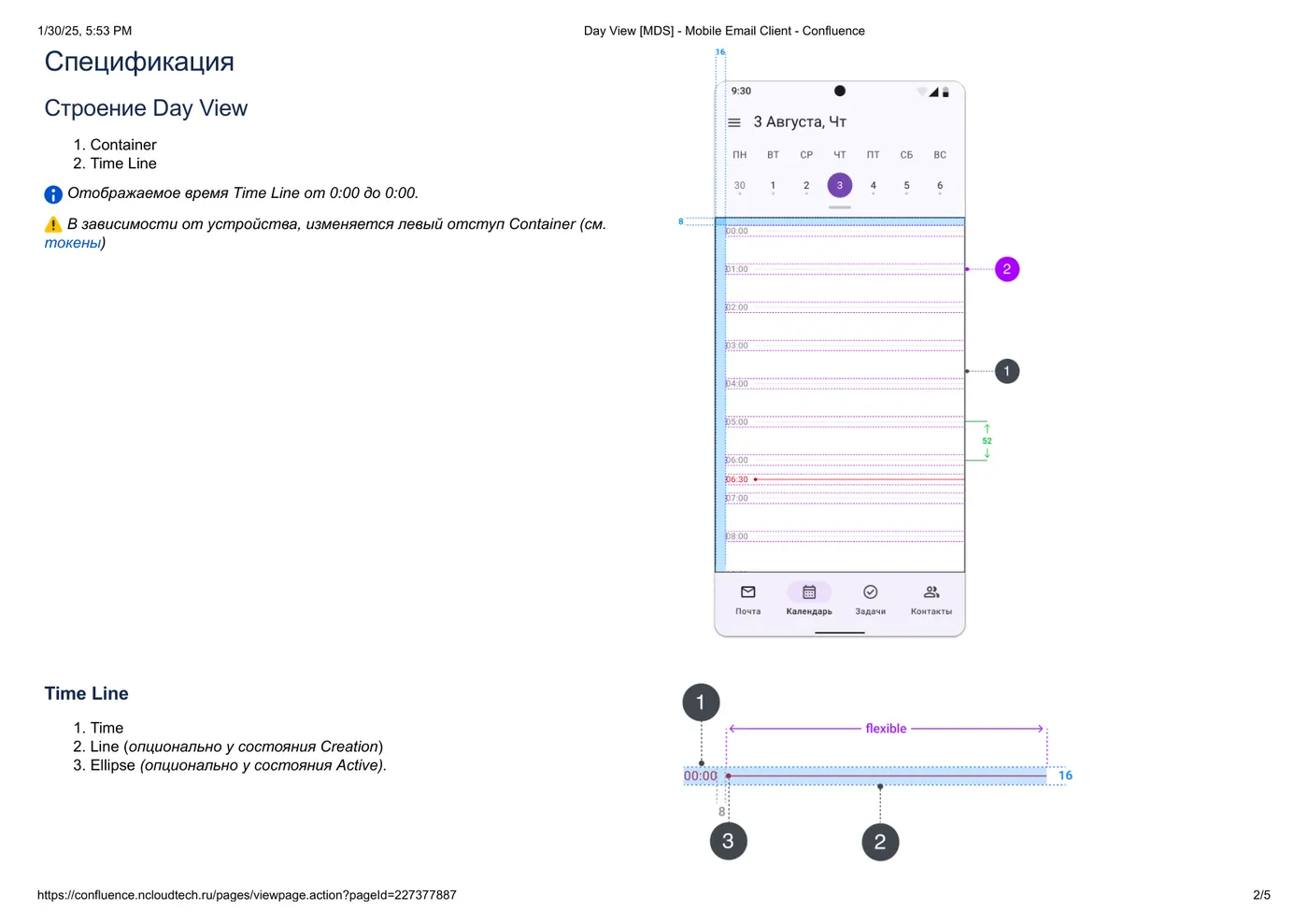
Documents are in their original working language — shown as authentic process artifacts.Die Dokumente sind in der Original-Arbeitssprache — gezeigt als authentische Prozess-Artefakte.
12Split-test: how creation should workSplit-Test: wie Erstellen funktionieren soll
Three prototype variants, randomized groups, first-click testing. The data was unambiguous — and it overruled the "obvious" FAB-first pattern.
Drei Prototyp-Varianten, randomisierte Gruppen, First-Click-Testing. Die Daten waren eindeutig — und überstimmten das „offensichtliche" FAB-First-Pattern.
| Finding | Number | Decision |
|---|---|---|
| Tap-on-grid beats floating action button | 1.5–3.5× more first-click success | slot-based creation is the primary path |
| Slot variant fastest overall | fastest time-to-created-event | bottom-sheet quick-create on slot tap |
| Top-App-Bar variant | 2–5× slower | rejected |
| Cancel via back-arrow only | found by just 13–39% | explicit cancel affordance added |
Shipped: two creation paths — tap a free slot for quick-create, FAB for the full form. Both earned their place with data.Ausgeliefert: zwei Erstellungswege — Tipp auf freien Slot für die Schnellerstellung, FAB für das vollständige Formular. Beide haben sich ihren Platz mit Daten verdient.
13The experiment that killed a pretty ideaDas Experiment, das eine hübsche Idee beerdigte
| Variant | SUS | Color recall | Verdict |
|---|---|---|---|
| Color-coded sections | 86 | ~20% recalled section colors | killed |
| Monochrome | 88 | — | shipped |
The colorful concept died on the spot. Restraint won — and this is the slide I show when someone asks what "data-driven" actually means.Das bunte Konzept starb auf der Stelle. Zurückhaltung gewann — und das ist die Folie, die ich zeige, wenn jemand fragt, was „data-driven" wirklich heißt.
14Push notifications — one size fits nobodyPush-Benachrichtigungen — Einheitsgröße passt niemandem
| Segment | Priority | Design consequence |
|---|---|---|
| Internal users | 89% put event reminders above mail push | calendar reminders default-on, mail push secondary |
| External users | split ~60/40 the other way | per-segment defaults + easy per-type controls |
Notification priority isn't universal — it depends on the segment. The setting defaults differ by audience instead of forcing one hierarchy on everyone.Notification-Priorität ist nicht universell — sie hängt vom Segment ab. Die Standardeinstellungen unterscheiden sich je Zielgruppe, statt allen eine Hierarchie aufzuzwingen.
15Permissions & corner casesBerechtigungen & Corner Cases
Enterprise calendars live or die on the unglamorous parts: role-based event permissions (owner / editor / invitee), a recurrence and reminder system, and corner cases most calendars fumble.
Enterprise-Kalender leben oder sterben mit den unglamourösen Teilen: rollenbasierte Termin-Berechtigungen (Owner / Editor / Eingeladene), ein Wiederholungs- und Erinnerungssystem und Corner Cases, an denen die meisten Kalender scheitern.
| Corner case | Design decision |
|---|---|
| Event spanning midnight | rendered continuously across both days — not split into two confusing fragments |
| Invitee edits vs owner edits | role-based permissions surface exactly what each role can change — no silent failures |
| Recurring event, single instance changed | explicit "this event / whole series" choice at edit time, not buried in a dialog after saving |
| Timezone shift mid-series | times anchored and displayed with explicit zone when device and event zones diverge |
16Design QA — the last research loopDesign QA — die letzte Research-Schleife
Research didn't stop at handoff. After implementation, I ran a designer-led review of the shipped meeting scheduler against the specs — so what users got matched what the data had earned.
Research endete nicht beim Handoff. Nach der Implementierung habe ich den ausgelieferten Meeting-Scheduler in einem Designer-Review gegen die Spezifikation geprüft — damit die Nutzer bekamen, was die Daten sich verdient hatten.
| Issues filed | Triage | Outcome |
|---|---|---|
| 37 | CRITICAL / MAJOR / MINOR | criticals fixed before release; minors scheduled — nothing shipped silently broken |
17Outcomes — including the honest missErgebnisse — inklusive des ehrlichen Fehlschlags
To be honest about the miss: retention landed at roughly 50% against a 65% goal. Instead of explaining it away, we treated it as the sharpest open question — and it became the starting hypothesis of the next research cycle.
Ehrlich zum verfehlten Ziel: Die Retention lag bei rund 50% gegenüber einem Ziel von 65%. Statt es wegzuerklären, haben wir es als die schärfste offene Frage behandelt — und sie wurde zur Ausgangshypothese des nächsten Research-Zyklus.